







Securing CI/CD Pipelines in AWS: Preventing Supply Chain Attacks and Pipeline Compromise

Introduction
Continuous Integration and Continuous Delivery (CI/CD) pipelines have become a foundational component of modern cloud-native application development. By automating build, testing, and deployment workflows, CI/CD enables organizations to release software rapidly while maintaining consistent and repeatable deployment practices.
In AWS environments, CI/CD pipelines commonly integrate with services such as AWS CodePipeline, CodeBuild, CodeDeploy, CloudFormation, container registries, and infrastructure provisioning tools. These pipelines often operate with elevated permissions to deploy infrastructure, update services, and manage cloud resources across multiple environments.
While automation accelerates development velocity, it also introduces significant security risks. A compromised pipeline can allow attackers to inject malicious code, deploy unauthorized infrastructure, escalate privileges, or access sensitive data. Because pipelines interact with multiple stages of the software delivery lifecycle, they can become high impact entry points for software supply chain attacks.
Recent industry incidents have shown that attackers increasingly target software delivery pipelines rather than production systems directly. By compromising a pipeline, attackers can modify application artifacts or infrastructure configurations before they reach production environments.
Securing CI/CD pipelines in AWS therefore requires a comprehensive approach that protects identities, source repositories, build environments, artifacts, and deployment workflows.
This article examines common CI/CD attack paths and outlines enterprise best practices for designing secure pipeline architectures in AWS.
Why CI/CD Pipeline Security Matters
CI/CD pipelines are responsible for building, testing, and deploying applications across cloud environments. In AWS, these pipelines commonly interact with services such as CodePipeline, CodeBuild, CodeDeploy, CloudFormation, Amazon ECR, and infrastructure automation tools to provision and update resources.
Because pipelines automate both infrastructure provisioning and application deployments, they typically operate with elevated permissions. If compromised, attackers may modify application code, deploy malicious infrastructure, or access sensitive cloud resources. Unlike traditional infrastructure attacks that target running systems, pipeline compromises occur earlier in the software delivery lifecycle, allowing malicious changes to propagate automatically through deployment workflows.
Several characteristics make CI/CD pipelines particularly attractive targets:
Centralized Deployment Control
Pipelines often manage deployments across multiple environments such as development, staging, and production. Compromising a single pipeline can therefore impact the entire application lifecycle.
Elevated IAM Permissions
Pipeline roles frequently have permissions to create infrastructure, update services, or modify IAM policies. If these permissions are overly broad, attackers may be able to escalate privileges or manipulate cloud resources.
Integration with Multiple Services
CI/CD pipelines interact with source repositories, artifact storage, container registries, and deployment tools. Each integration introduces additional security considerations and potential attack surfaces.
Automated Execution
Once triggered, pipelines automatically execute build and deployment stages. Malicious code or configuration changes can therefore propagate quickly across environments.
For these reasons, securing CI/CD pipelines is essential for protecting both application integrity and cloud infrastructure. Organizations must implement strong access controls, secure build and artifact workflows, and continuously monitor pipeline activity to detect suspicious behavior.
Common CI/CD Attack Paths
CI/CD pipelines are attractive targets for attackers because they provide a centralized automation point for building and deploying applications. By compromising a pipeline, attackers can modify source code, inject malicious artifacts, or deploy unauthorized infrastructure.
In enterprise environments, CI/CD systems interact with multiple components including source repositories, build environments, artifact storage, and deployment tools. Each stage of the pipeline introduces potential attack vectors that adversaries may attempt to exploit.
Understanding these attack paths helps organizations implement security controls that protect the entire software delivery lifecycle.
Compromised Developer Credentials
One of the most common attack vectors involves compromised developer accounts. If attackers gain access to developer credentials, they may modify source repositories, alter pipeline configurations, or trigger unauthorized deployments.
Because CI/CD pipelines automatically build and deploy code changes, malicious commits can quickly propagate through the pipeline into production environments.
Risk Example
- Unauthorized code commits to production branches
- Pipeline configuration changes
- Deployment of malicious application updates
Defensive Controls
- Enforce multi-factor authentication (MFA) for developers
- Restrict repository access through role-based permissions
- Require code review approvals before merging changes
Pipeline Role Privilege Escalation
CI/CD pipelines typically operate using IAM roles that allow them to build artifacts, provision infrastructure, and deploy applications. If these roles are overly permissive, attackers who compromise the pipeline may escalate privileges and gain broader access to the AWS environment.
For example, pipeline roles that allow permissions such as iam:PassRole or iam:AttachRolePolicy may enable attackers to create or assume privileged roles.
Risk Example
- Creation of administrative IAM roles
- Unauthorized infrastructure provisioning
- Access to sensitive cloud resources
Defensive Controls
- Apply least-privilege IAM policies to pipeline roles
- Restrict role assumption permissions
- Monitor sensitive IAM API calls using CloudTrail
Malicious Code Injection
Attackers may attempt to inject malicious code into the software supply chain by modifying application repositories or build scripts. Once the code enters the CI/CD pipeline, it may be compiled and deployed automatically.
This technique can allow attackers to embed backdoors, data exfiltration mechanisms, or unauthorized access logic within deployed applications.
Risk Example
- Malicious code embedded in application updates
- Backdoors deployed to production services
- Data exfiltration through compromised applications
Defensive Controls
- Enforce mandatory code reviews
- Implement branch protection policies
- Monitor repository changes for suspicious commits
Dependency Supply Chain Attacks
Modern applications often rely on third-party libraries and package repositories. If a dependency is compromised, malicious code can be introduced during the build process.
Because CI/CD pipelines automatically install dependencies during builds, compromised packages can quickly propagate into deployed artifacts.
Risk Example
- Malicious package updates
- Dependency poisoning attacks
- Vulnerable third-party libraries introduced into builds
Defensive Controls
- Use trusted package repositories
- Implement dependency vulnerability scanning
- Pin dependency versions to prevent unauthorized updates
Pipeline Configuration Manipulation
CI/CD pipelines are typically defined through configuration files or infrastructure-as-code templates. Attackers who gain access to these configurations may alter build or deployment steps to execute unauthorized commands.
This may allow attackers to extract secrets, deploy unauthorized infrastructure, or modify artifacts before deployment.
Risk Example
- Modified build scripts
- Unauthorized deployment commands
- Extraction of secrets from pipeline environments
Defensive Controls
- Restrict pipeline configuration changes
- Implement approval gates for deployment workflows
- Monitor pipeline configuration changes through CloudTrail and AWS Config
Understanding these attack paths highlights why CI/CD security must be implemented across the entire software delivery lifecycle. The next section explores how organizations can design enterprise-grade CI/CD security architectures to protect each stage of the pipeline.
Enterprise CI/CD Security Architecture
Securing CI/CD pipelines in enterprise AWS environments requires a layered architecture that applies security controls across every stage of the software delivery lifecycle. Rather than focusing on a single component, organizations must protect the entire pipeline—from developer access and source repositories to build environments, artifact storage, and production deployments.
A secure pipeline architecture separates responsibilities between development, build, artifact management, and deployment stages while enforcing identity controls, governance guardrails, and continuous monitoring. This approach reduces the risk that a compromise in one stage of the pipeline will impact the entire environment.
In this architecture, security controls are applied at each stage of the pipeline:
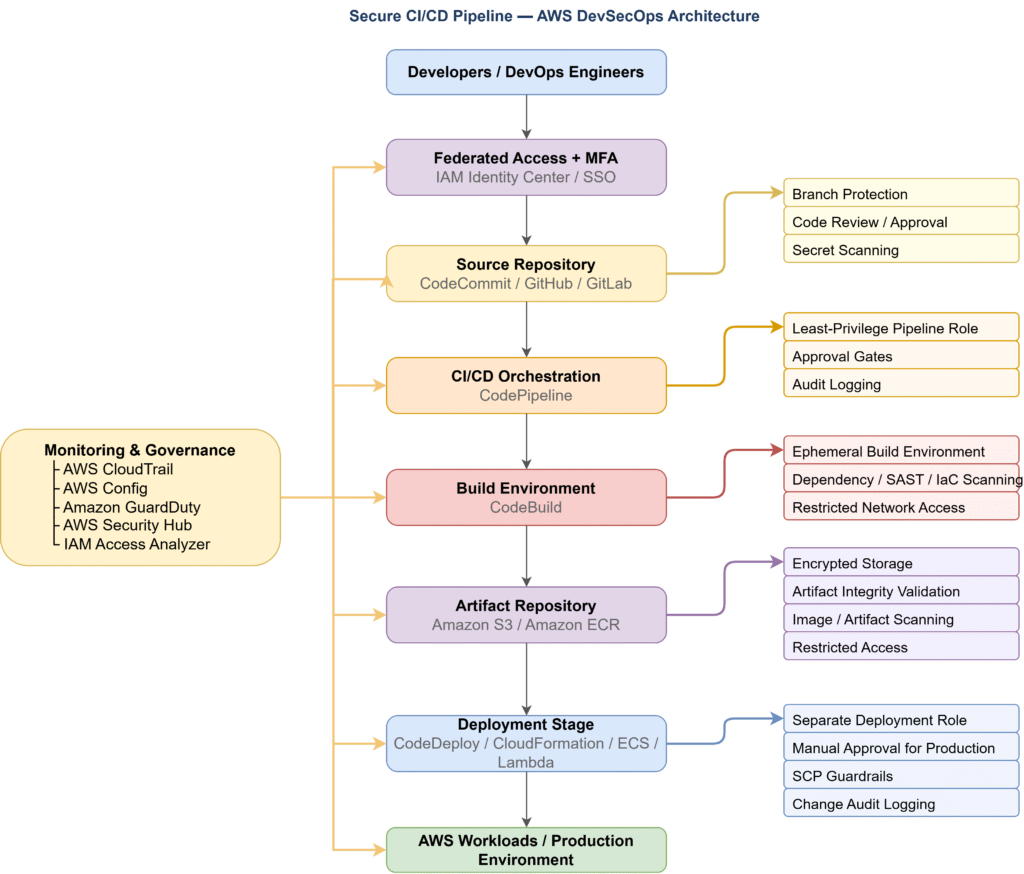
Identity and Access Control
Developers and automation systems access the pipeline using federated authentication and role-based access controls. Temporary credentials and least-privilege IAM roles help reduce the risk of credential misuse.
Source Repository Security
Source repositories must be protected using branch protection policies, mandatory code reviews, and secret scanning to prevent unauthorized code modifications.
Build Environment Security
Build environments should use ephemeral infrastructure, restricted network access, and dependency validation to protect against supply chain attacks.
Artifact Security
Build artifacts must be stored in encrypted repositories and validated before deployment to ensure that only trusted software components are released.
Deployment Guardrails
Deployment stages should enforce approval gates, restricted deployment roles, and governance controls such as Service Control Policies to prevent unauthorized infrastructure changes.
Monitoring and Governance
Centralized monitoring using services such as CloudTrail, GuardDuty, AWS Config, and Security Hub provides visibility into pipeline activity and helps detect suspicious behavior.
The following sections examine the security controls applied at each stage of the pipeline.
Identity and Access Management for CI/CD
Identity and access management forms the foundation of CI/CD pipeline security. In enterprise environments, multiple actors—including developers, automation systems, and deployment services—interact with the pipeline. Without strict identity controls, attackers who gain access to a pipeline role or developer credential can deploy malicious code or modify infrastructure.
A secure CI/CD pipeline should enforce strong authentication, role-based access controls, and temporary credentials to reduce the risk of credential misuse and privilege escalation.
Enforcing Strong Authentication
All developer and administrator access to CI/CD systems should require multi-factor authentication (MFA). Enterprises typically integrate AWS with identity providers such as Azure AD, Okta, or other SSO platforms through IAM Identity Center.
Federated authentication provides several security advantages:
• Centralized identity management
• MFA enforcement for privileged operations
• Rapid user access revocation
• Improved audit visibility
Using federated identities also eliminates the need for long-lived IAM user credentials.
Using Role-Based Access Controls
Instead of assigning permissions directly to users, CI/CD pipelines should rely on IAM roles. Each component of the pipeline should have a dedicated role with the minimum permissions required to perform its function.
Typical roles in an enterprise pipeline include:
| Role | Purpose |
| Developer Role | Commit code and trigger pipeline executions |
| Pipeline Role | Orchestrate pipeline stages and invoke build services |
| Build Role | Execute build jobs and access dependency repositories |
| Deployment Role | Provision infrastructure and deploy applications |
Separating these roles prevents a compromise in one stage of the pipeline from granting unrestricted access to the entire environment.
Eliminating Long-Lived Credentials
Long-lived access keys are a major source of cloud credential compromise. CI/CD pipelines should instead use temporary credentials issued through AWS Security Token Service (STS).
Temporary credentials provide several security benefits:
• Automatic expiration
• Reduced attack surface
• Improved traceability in CloudTrail logs
Pipeline services such as CodePipeline and CodeBuild automatically assume IAM roles using temporary credentials, reducing the risk of credential leakage.
Restricting Role Assumptions
Attackers often exploit role chaining to escalate privileges within AWS environments. To prevent this, organizations should restrict role assumptions using IAM condition policies.
Example restrictions include:
• Limiting role assumptions to specific services
• Restricting access by source IP address
• Enforcing MFA conditions for privileged roles
• Limiting cross-account role assumptions
These controls help prevent attackers from using compromised credentials to escalate privileges within the pipeline.
Auditing IAM Activity
IAM activity should be continuously monitored using services such as AWS CloudTrail, GuardDuty, and IAM Access Analyzer to detect unauthorized role assumptions or suspicious pipeline activity.
Securing the Source Repository
The source repository is the entry point of the CI/CD pipeline. Application code, infrastructure templates, and pipeline configuration files are typically stored in repositories such as AWS CodeCommit, GitHub, or GitLab. Because these repositories determine what code enters the pipeline, unauthorized changes at this stage can lead to compromised builds and malicious deployments.
To reduce this risk, enterprises must implement strong governance controls around repository access and code changes.
Enforcing Repository Access Controls
Access to source repositories should follow the principle of least privilege. Only authorized developers and automation systems should be able to modify code or trigger pipeline executions.
Recommended access controls include:
• Role-based access using IAM roles or federated identities
• Restricting repository write access to approved development teams
• Preventing direct pushes to protected branches
• Limiting repository access to trusted networks or identity providers
These controls help prevent unauthorized users from introducing malicious code into the pipeline.
Implementing Branch Protection
Branch protection policies ensure that critical branches—such as main, master, or production—cannot be modified without proper review and approval.
Common enterprise branch protection rules include:
• Mandatory pull request workflows
• Required code reviews before merging changes
• Preventing direct commits to protected branches
• Restricting force pushes and history rewrites
By enforcing structured code review processes, organizations can detect potential security risks before code reaches production.
Preventing Secret Leakage
Source repositories are a common location for accidental credential exposure. Developers may unintentionally commit sensitive information such as API keys, database credentials, or private certificates.
To reduce this risk, enterprises should implement automated secret scanning within repositories.
Common protections include:
• Automated secret scanning tools
• Blocking commits containing sensitive credentials
• Monitoring repositories for exposed keys
• Rotating compromised credentials immediately
AWS services such as Amazon CodeGuru Reviewer and external tools like GitHub Secret Scanning can help detect exposed credentials early in the development process.
Securing Infrastructure as Code
Many CI/CD pipelines store Infrastructure as Code (IaC) templates—such as AWS CloudFormation or Terraform files—in the same repositories as application code. If these templates are modified maliciously, attackers may deploy insecure infrastructure or grant elevated permissions to services.
Enterprises should implement security validation for infrastructure templates, including:
• Automated scanning for insecure configurations
• Policy validation before infrastructure deployment
• Version control for infrastructure changes
• Mandatory approval workflows for infrastructure updates
These controls help prevent unauthorized or insecure infrastructure configurations from being deployed.
Auditing Repository Activity
Continuous visibility into repository activity helps organizations detect unauthorized modifications and investigate suspicious behavior.
Security teams should monitor:
• Repository access logs
• Code commits and pull requests
• Branch modifications
• Repository permission changes
Repository activity logs should be integrated with centralized security monitoring platforms to detect unauthorized changes or suspicious commit activity.
Securing the Build Environment
The build environment is responsible for compiling code, installing dependencies, and generating deployable artifacts. Because build systems execute scripts and interact with external repositories, they are a frequent target for software supply chain attacks.
If attackers compromise the build environment, they can modify compiled artifacts, inject malicious dependencies, or introduce backdoors into application binaries. Securing the build stage is therefore essential for maintaining the integrity of the CI/CD pipeline.
Enterprise environments should implement strict security controls to ensure that build processes remain isolated, reproducible, and protected from unauthorized access.
Using Ephemeral Build Environments
Build environments should be temporary and isolated, ensuring that each build starts from a clean state. Persistent build servers can accumulate credentials, cached dependencies, and configuration changes that attackers may exploit.
Using ephemeral environments provides several benefits:
• Reduces the risk of persistent malware in build servers
• Ensures consistent and reproducible builds
• Eliminates leftover credentials or artifacts from previous builds
Services such as AWS CodeBuild automatically create isolated build containers that are destroyed after the build process completes.
Restricting Build Permissions
Build services should operate using least-privilege IAM roles. The build role should only have permissions required to:
• Retrieve source code
• Access approved dependency repositories
• Store build artifacts
Build systems should not have broad administrative permissions such as AdministratorAccess or unrestricted IAM privileges. Restricting permissions prevents attackers from using compromised build environments to manipulate infrastructure or access sensitive resources.
Validating Dependencies
Modern applications rely heavily on open-source libraries and third-party packages. Malicious or vulnerable dependencies can introduce security risks into the application during the build process.
Organizations should implement dependency validation mechanisms such as:
• Software Composition Analysis (SCA) tools
• Dependency vulnerability scanning
• Package integrity verification
These tools help identify vulnerable or compromised dependencies before they are included in the build output.
Scanning Code and Infrastructure
Security validation should be integrated directly into the build stage. Automated scanning tools can analyze application code and infrastructure templates to detect potential vulnerabilities before deployment.
Common build-stage security checks include:
• Static Application Security Testing (SAST) for application code
• Infrastructure-as-Code scanning for misconfigurations
• Container image scanning for vulnerabilities
Integrating these checks into the build pipeline helps identify security issues early in the development lifecycle.
Restricting Network Access
Build environments often download dependencies from external repositories. If network access is unrestricted, attackers may attempt to redirect builds to malicious package sources.
To reduce this risk, enterprises should:
• Restrict outbound network access from build environments
• Use approved internal package repositories when possible
• Monitor network activity for unusual dependency downloads
Network controls help prevent unauthorized communication between build environments and untrusted systems.
Securing Build Artifacts
Build artifacts are the deployable outputs generated during the CI/CD process. These artifacts may include compiled application binaries, container images, configuration packages, or infrastructure templates. Because artifacts move directly into deployment environments, protecting their integrity is essential to prevent unauthorized modifications or malicious code injection.
Enterprise CI/CD pipelines must ensure that artifacts remain trusted, verified, and protected throughout their lifecycle.
Using Secure Artifact Repositories
Artifacts should be stored in controlled repositories such as Amazon S3 or Amazon Elastic Container Registry (ECR). These repositories act as centralized storage locations where build outputs can be versioned, audited, and securely accessed by deployment systems.
Key artifact repository protections include:
• Enabling encryption using AWS Key Management Service (KMS)
• Restricting access to pipeline and deployment roles only
• Preventing direct uploads by unauthorized users
• Enforcing versioning to track artifact changes
Centralized artifact repositories ensure that deployment stages always retrieve artifacts from a trusted and traceable source.
Validating Artifact Integrity
Artifact integrity validation ensures that the deployed artifact matches the artifact generated during the build stage. Without integrity validation, attackers could replace or modify artifacts before deployment.
Organizations commonly implement integrity verification using:
• Cryptographic hashing of build outputs
• Artifact signing mechanisms
• Automated verification during deployment
These controls ensure that artifacts cannot be modified without detection.
Scanning Artifacts for Vulnerabilities
Before artifacts are deployed, they should be scanned for security vulnerabilities. This is particularly important for container images and packaged application binaries.
Enterprises typically integrate vulnerability scanning tools such as:
• Amazon ECR image scanning
• Container security scanners
• Binary vulnerability scanning tools
These tools detect known vulnerabilities and misconfigurations that may expose production systems to risk.
Restricting Artifact Access
Artifact repositories should enforce strict access controls to prevent unauthorized modifications or downloads.
Recommended controls include:
• Limiting artifact access to deployment services
• Preventing direct developer access to production artifacts
• Enforcing IAM policies for artifact retrieval
• Monitoring artifact repository activity
Restricting access ensures that artifacts cannot be altered outside of the approved CI/CD workflow.
Monitoring Artifact Activity
Continuous monitoring of artifact repositories helps detect unauthorized activity such as artifact tampering or suspicious downloads.
Security teams should monitor:
• Artifact uploads and modifications
• Access to container repositories
• Artifact download patterns
• Changes to repository permissions
Artifact repository activity should be logged and monitored to detect unauthorized uploads or downloads.
The deployment stage releases build artifacts into environments such as development, staging, or production. Because this stage directly modifies application services and cloud infrastructure, it is one of the most sensitive parts of the CI/CD pipeline.
If deployment workflows are not properly secured, attackers may deploy unauthorized artifacts, alter infrastructure configurations, or introduce malicious changes into production systems.
Enterprise CI/CD pipelines therefore enforce strict controls such as role separation, approval gates, infrastructure governance, and environment isolation to ensure that only validated artifacts and approved changes are deployed.
Using Dedicated Deployment Roles
Deployment processes should run using separate IAM roles specifically designed for deployment tasks. These roles should have permissions only for the resources required to deploy applications or update infrastructure.
Separating deployment roles from build and pipeline roles reduces the impact of a compromise in earlier pipeline stages. For example, if a build environment is compromised, attackers should not automatically gain permissions to modify production infrastructure.
Recommended practices include:
• Using dedicated IAM roles for deployment services
• Granting least-privilege access to infrastructure resources
• Restricting cross-account role assumptions
• Monitoring role usage through CloudTrail logs
Implementing Approval Gates
Enterprise pipelines typically include manual approval steps before production deployments. These approval gates ensure that critical changes are reviewed by authorized personnel before infrastructure or applications are modified.
Approval workflows may include:
• Security team validation of deployment artifacts
• Change management approval processes
• Automated testing verification before release
Manual approval checkpoints help prevent unauthorized or accidental deployments into sensitive environments.
Enforcing Infrastructure Governance
Infrastructure provisioning should be controlled through Infrastructure as Code (IaC) tools such as AWS CloudFormation or Terraform. This ensures that infrastructure changes remain version-controlled, auditable, and repeatable.
To strengthen governance, organizations should enforce additional guardrails including:
• Service Control Policies (SCPs) that restrict risky actions
• Policies preventing deletion of logging or monitoring services
• Restrictions on creating overly permissive IAM roles
These governance mechanisms prevent deployments from bypassing enterprise security controls.
Isolating Deployment Environments
Enterprises typically maintain separate environments for development, testing, staging, and production. Isolating these environments reduces the risk that experimental changes or compromised workloads affect production systems.
Recommended practices include:
• Using separate AWS accounts for production environments
• Restricting deployment permissions across environments
• Applying stronger security policies for production accounts
Environment isolation ensures that production workloads remain protected even if lower environments are compromised.
Monitoring Deployment Activity
Deployment activity should be continuously monitored to detect unauthorized infrastructure changes or suspicious pipeline behavior.
Security teams should track:
• Infrastructure provisioning events
• Deployment role activity
• Changes to application configurations
• Cross-account deployment actions
Monitoring and Detecting CI/CD Pipeline Threats
Preventive controls alone cannot fully eliminate security risks in CI/CD pipelines. Organizations must also implement continuous monitoring to detect suspicious pipeline activity, credential misuse, or unauthorized infrastructure changes.
Enterprise environments typically rely on centralized monitoring services that provide visibility across CI/CD components, IAM roles, and deployment actions.
Continuous monitoring helps security teams detect attacks such as:
• Unauthorized pipeline executions
• Suspicious role assumptions by pipeline services
• Unexpected infrastructure changes
• Malicious artifact deployments
By integrating monitoring with automated alerts and investigation workflows, organizations can quickly respond to potential security incidents.
Monitoring Pipeline Activity with CloudTrail
AWS CloudTrail records API activity across AWS services, including CI/CD operations. Monitoring CloudTrail logs provides visibility into pipeline actions such as:
• Pipeline execution triggers
• Build job creation and execution
• Artifact access operations
• Deployment actions
Security teams can analyze CloudTrail logs to identify suspicious activity such as unexpected pipeline triggers or unauthorized infrastructure changes.
Detecting Credential Misuse with GuardDuty
Amazon GuardDuty continuously analyzes AWS activity to detect anomalous behavior associated with compromised credentials.
GuardDuty can detect indicators such as:
• API calls from unusual geographic locations
• Suspicious IAM role assumptions
• Unusual usage patterns for pipeline roles
• Potential privilege escalation attempts
These alerts help security teams investigate possible credential compromise within CI/CD environments.
Centralizing Findings with Security Hub
Enterprise environments often operate across multiple AWS accounts and regions. AWS Security Hub aggregates security findings from services such as GuardDuty, AWS Config, and third-party security tools.
Security Hub enables organizations to:
• Centralize pipeline security findings
• Prioritize vulnerabilities and threats
• Track remediation progress across accounts
By consolidating security alerts, Security Hub helps security teams maintain visibility across the entire CI/CD infrastructure.
Real-World CI/CD Attack Scenarios
Understanding real-world CI/CD attacks helps organizations identify weaknesses in their pipeline architecture and implement stronger security controls.
Attackers frequently target CI/CD systems because compromising the pipeline provides a direct path to production infrastructure.
Scenario 1: Compromised Developer Credentials
An attacker gains access to a developer account through phishing or credential leakage. The attacker pushes malicious code to the repository, triggering the CI/CD pipeline and deploying compromised artifacts into production.
Lesson
• Enforce MFA for developer access
• Monitor repository activity
• Restrict pipeline execution permissions
Scenario 2: Compromised Build Environment
An attacker exploits a vulnerable dependency or build script and injects malicious code during the build stage. The compromised artifact is then deployed into production systems.
Lesson
• Use ephemeral build environments
• Validate dependencies
• Implement artifact integrity verification
Scenario 3: Pipeline Role Privilege Escalation
An over-permissive pipeline role allows attackers to modify IAM policies or create privileged roles. Once the role is compromised, attackers gain administrative access to the AWS environment.
Lesson
• Enforce least-privilege IAM roles
• Monitor IAM changes
• Restrict role assumptions
Best Practices Summary
To protect enterprise CI/CD environments from supply chain attacks and unauthorized deployments, organizations should implement the following best practices:
- Enforce federated authentication and MFA for developer access
- Apply least-privilege IAM roles across pipeline components
- Protect source repositories with branch protection and code review
- Use ephemeral build environments and dependency validation
- Secure artifact repositories with encryption and integrity validation
- Implement approval gates before production deployments
- Enforce governance guardrails with Service Control Policies
- Monitor pipeline activity using CloudTrail and GuardDuty
- Aggregate security findings using Security Hub or SIEM platforms
Applying these practices ensures that CI/CD pipelines remain secure while supporting rapid software delivery.
Conclusion
CI/CD pipelines are critical components of modern cloud development environments, but they also represent high-value targets for attackers. A compromised pipeline can lead to unauthorized deployments, infrastructure manipulation, or software supply chain attacks.
By implementing strong identity controls, securing source repositories, protecting build environments, validating artifacts, enforcing deployment guardrails, and continuously monitoring pipeline activity, organizations can significantly reduce the risk of CI/CD security breaches.
A well-secured pipeline enables enterprises to maintain both development agility and strong security governance as they scale their cloud environments.
About the Author
Deepali Sonune is a DevOps engineer with over 12 years of industry experience, including 9+ years specializing in AWS. She designs and implements high-performance, secure, and governance-driven cloud architectures. Deepali collaborates closely with development and IT teams to streamline release processes, combining deep engineering expertise with strong automation and security practices.
 Linkedin