







Don’t bake the agent: Account-aware SentinelOne enrollment with EC2 Image Builder
Listen to this article:
Organizations that standardize Amazon Elastic Compute Cloud (Amazon EC2) deployments with golden Amazon Machine Images (AMIs) commonly need an endpoint security agent on every instance. Installing the agent while building the image appears straightforward, but an enrolled endpoint agent contains machine-specific identity and registration state. Capturing that state in an AMI can clone it onto every instance launched from the image.
A second challenge appears in a multi-account environment. Different AWS accounts may belong to different security boundaries or SentinelOne sites. A single registration token embedded in a conventional installation step sends every instance to the same site, regardless of the account in which it runs.
This post presents a different pattern for Amazon Linux 2023. EC2 Image Builder bakes the bootstrap mechanism, but not an installed SentinelOne agent, into the golden AMI. On first boot, a systemd service:
- Discovers the instance’s AWS account, Region, instance ID, and architecture through Instance Metadata Service Version 2 (IMDSv2).
- Uses a least-privileged SentinelOne API service account to inspect dynamic groups and resolve the AWS account to a SentinelOne site.
- Retrieves that site’s registration token and the latest compatible generally available (GA) Linux RPM.
- Verifies, installs, registers, enables, and starts a unique agent.
- Records a machine-readable result, removes bootstrap material, and permanently disables itself.
The same golden AMI design can be distributed to approved accounts through AWS Organizations and copied to any required AWS Region. Because the implementation described here does not assume that launched instances have an IAM instance profile authorized to call Parameter Store or Secrets Manager, its SentinelOne API credential is embedded in the AMI. This post examines that trade-off candidly and provides a safer alternative for environments that can guarantee runtime access to those services.
Solution overview
The architecture has two independent control planes:
- The image supply plane builds an encrypted golden AMI and makes a region-local copy available to approved AWS accounts. AWS Organizations organizational unit (OU) launch permissions can grant access to all child accounts without maintaining a list of account IDs.
- The endpoint enrollment plane runs inside each new EC2 instance. It uses the instance’s own account identity to select the appropriate SentinelOne site and creates unique endpoint state only after launch.
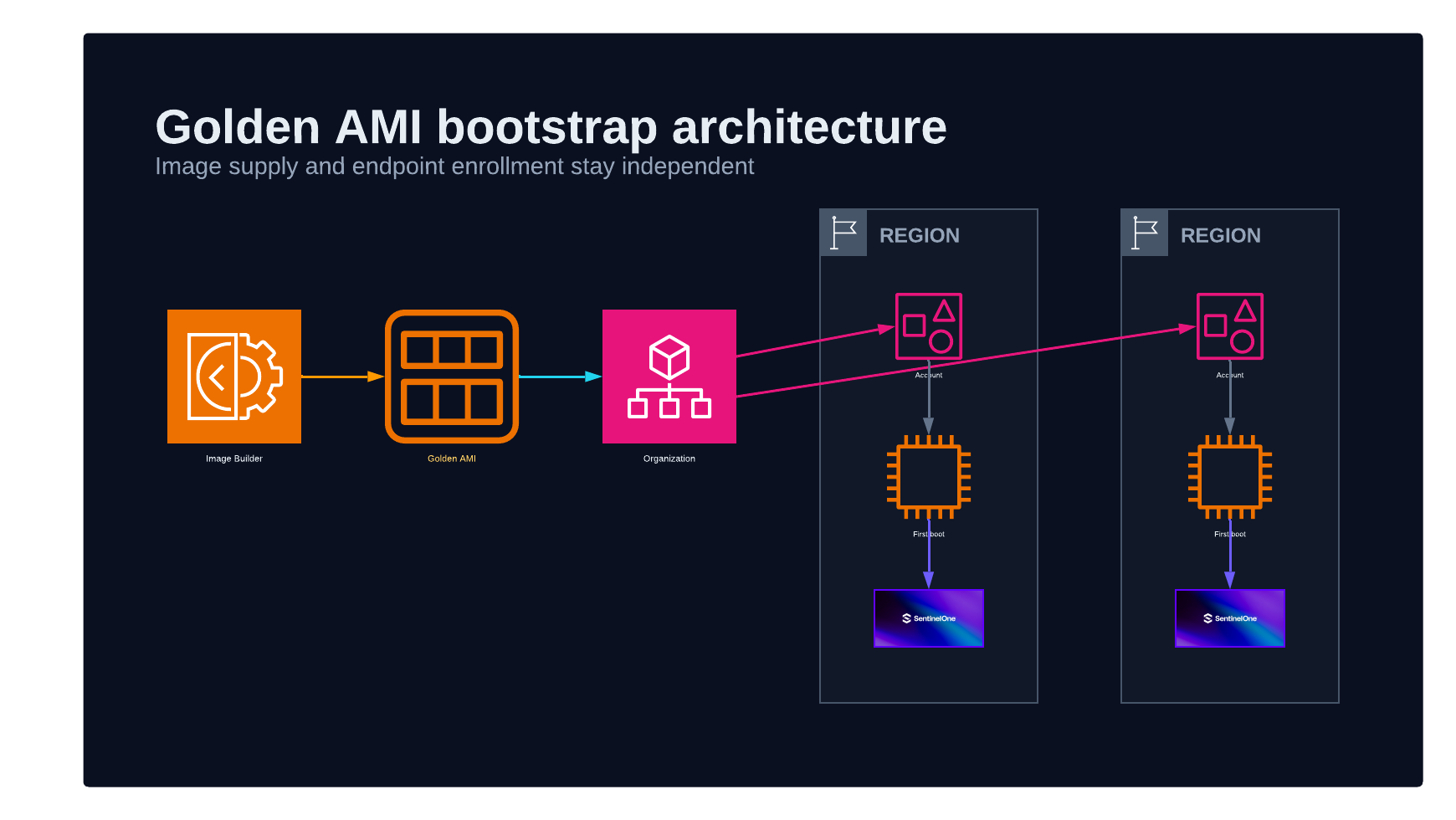
This separation is the central design decision. AWS account and Region distribution determine where the image can run. First-boot resolution determines where the endpoint registers. Neither control plane needs a per-account AMI variant.
An AMI is a regional resource. EC2 Image Builder can copy an output AMI to configured Regions, and launch permissions can be applied to the copies. The bootstrap itself is Region-independent because it uses only link-local IMDSv2 and the SentinelOne HTTPS API at runtime. The instance still requires DNS resolution and outbound HTTPS connectivity to the configured SentinelOne console and package endpoint.
Prerequisites
This pattern assumes the following:
- An EC2 Image Builder pipeline produces an Amazon Linux 2023 AMI.
- The parent image does not contain an installed or previously enrolled SentinelOne agent.
- Output AMIs and snapshots are encrypted according to your organization’s KMS and AMI-sharing standards.
- The build instance role can read one specific SecureString parameter and decrypt it when using the embedded-token option.
- A dedicated SentinelOne service user has the minimum API permissions described later in this post.
- Target subnets can reach IMDSv2 and the SentinelOne console over HTTPS, directly or through an approved proxy.
- Each intended AWS account is represented in a SentinelOne dynamic-group filter, or a deliberately chosen fallback site is available.
Bake bootstrap capability, not endpoint identity
The finished image contains the files and dependencies needed to bootstrap SentinelOne, but no agent package, service, endpoint UUID, site token, or enrollment state.
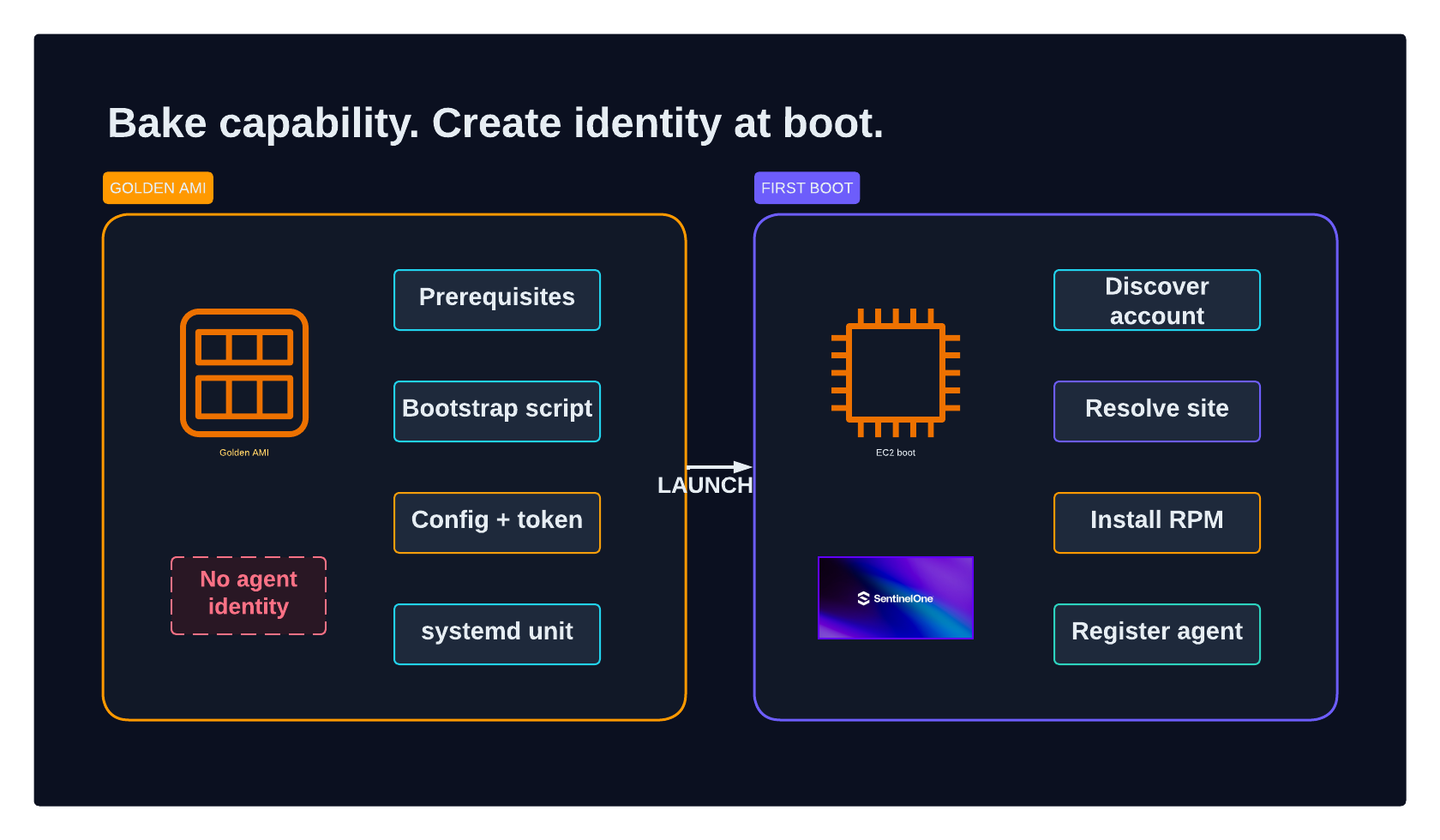
A representative layout is shown in the following table.
| Item | Location | Purpose |
|---|---|---|
| Bootstrap program | /usr/local/sbin/s1-bootstrap.sh |
Root-only first-boot orchestration |
| Nonsecret configuration | /etc/s1-bootstrap/config |
Console URL, fallback site, token-file path, and policy settings |
| Bootstrap API token | /etc/s1-bootstrap/api-token |
Root-only credential staged for deployments that cannot depend on runtime AWS permissions |
| systemd unit | /etc/systemd/system/s1-bootstrap.service |
Runs the bootstrap once after network readiness |
| State directory | /var/lib/s1-bootstrap/ |
Lock, completion marker, temporary package, and result JSON |
| Diagnostic log | /var/log/s1-bootstrap.log |
Root-only detailed execution record |
Install and validate prerequisites during the build
The bootstrap uses jq for every API response, gzip to unpack the staged script, and flock from util-linux to serialize execution. It also uses curl, hashing tools, rpm, and systemctl. Detect missing binaries while building the image rather than on every future first boot.
The following abbreviated EC2 Image Builder component document demonstrates the pattern.
name: SentinelOneBootstrapPrerequisites
description: Install and validate first-boot dependencies
schemaVersion: 1.0

phases:
  - name: build
    steps:
      - name: InstallBootstrapPrerequisites
        action: ExecuteBash
        inputs:
          commands:
            - |
              #!/bin/bash
              set -euo pipefail
              dnf install -y jq gzip util-linux

              missing=""
              for binary in jq gzip curl sha1sum sha256sum \
                            shred flock rpm systemctl base64 stat; do
                command -v "$binary" >/dev/null 2>&1 || \
                  missing="${missing} ${binary}"
              done

              if [ -n "$missing" ]; then
                echo "FATAL: missing binaries:${missing}" >&2
                exit 1
              fi
Amazon Linux 2023 includes coreutils-single. Avoid replacing it unintentionally by installing an overlapping package solely to obtain commands that are already present.
Stage the script as a root-only executable
The pipeline stages the bootstrap script late in the recipe and validates it immediately. Whether you store the source in the component document or in a controlled Amazon Simple Storage Service (Amazon S3) object, pin and verify the content through your normal software-supply-chain process.
install -d -m 0755 -o root -g root /var/lib/s1-bootstrap
install -d -m 0700 -o root -g root /etc/s1-bootstrap
install -m 0700 -o root -g root \
  ./s1-bootstrap.sh /usr/local/sbin/s1-bootstrap.sh

bash -n /usr/local/sbin/s1-bootstrap.sh
head -n1 /usr/local/sbin/s1-bootstrap.sh | grep -q '^#!/bin/bash'
Stage the token only after all build-time reboots
Base-image hardening can involve kernel changes and reboots. Do not enable the first-boot service until the last build-time reboot has completed. Otherwise, the service can run on the Image Builder build instance, install and register an agent there, and then capture that identity in the AMI.
For the no-runtime-IAM design, the build retrieves a SentinelOne API token from one narrowly authorized SecureString parameter. The token is written without whitespace, owned by root, and readable only by root.
parameters:
  - BuildRegion:
      type: string
  - TokenParameterName:
      type: string

phases:
  - name: build
    steps:
      - name: StageSentinelOneApiToken
        action: ExecuteBash
        inputs:
          commands:
            - |
              #!/bin/bash
              set -euo pipefail
              umask 0077

              aws --region "{{ BuildRegion }}" ssm get-parameter \
                --name "{{ TokenParameterName }}" \
                --with-decryption \
                --query 'Parameter.Value' \
                --output text \
                | tr -d '[:space:]' \
                > /etc/s1-bootstrap/api-token

              chown root:root /etc/s1-bootstrap/api-token
              chmod 0600 /etc/s1-bootstrap/api-token
              test -s /etc/s1-bootstrap/api-token
The build role should allow ssm:GetParameter only on that parameter and kms:Decrypt only on its customer-managed KMS key, with suitable encryption-context and kms:ViaService conditions. Never print the token or place it directly in an Image Builder component parameter, command line, tag, log message, or infrastructure-as-code state.
Later in this post, the token-delivery section explains why staging a secret in an AMI remains risky even when the AMI is encrypted.
Why systemd instead of cloud-init
A bootstrap implemented only as EC2 user data is controlled by the principal launching the instance. That principal can provide a different user-data payload, omit the installation, or replace a launch-template value. The security-agent bootstrap in this design is instead part of the image’s operating-system service graph.
This makes installation independent of whether cloud-init is enabled, whether user data is provided, and what application bootstrap the workload owner chooses. The service begins after the operating system reports network readiness and does not wait for application user data to finish.
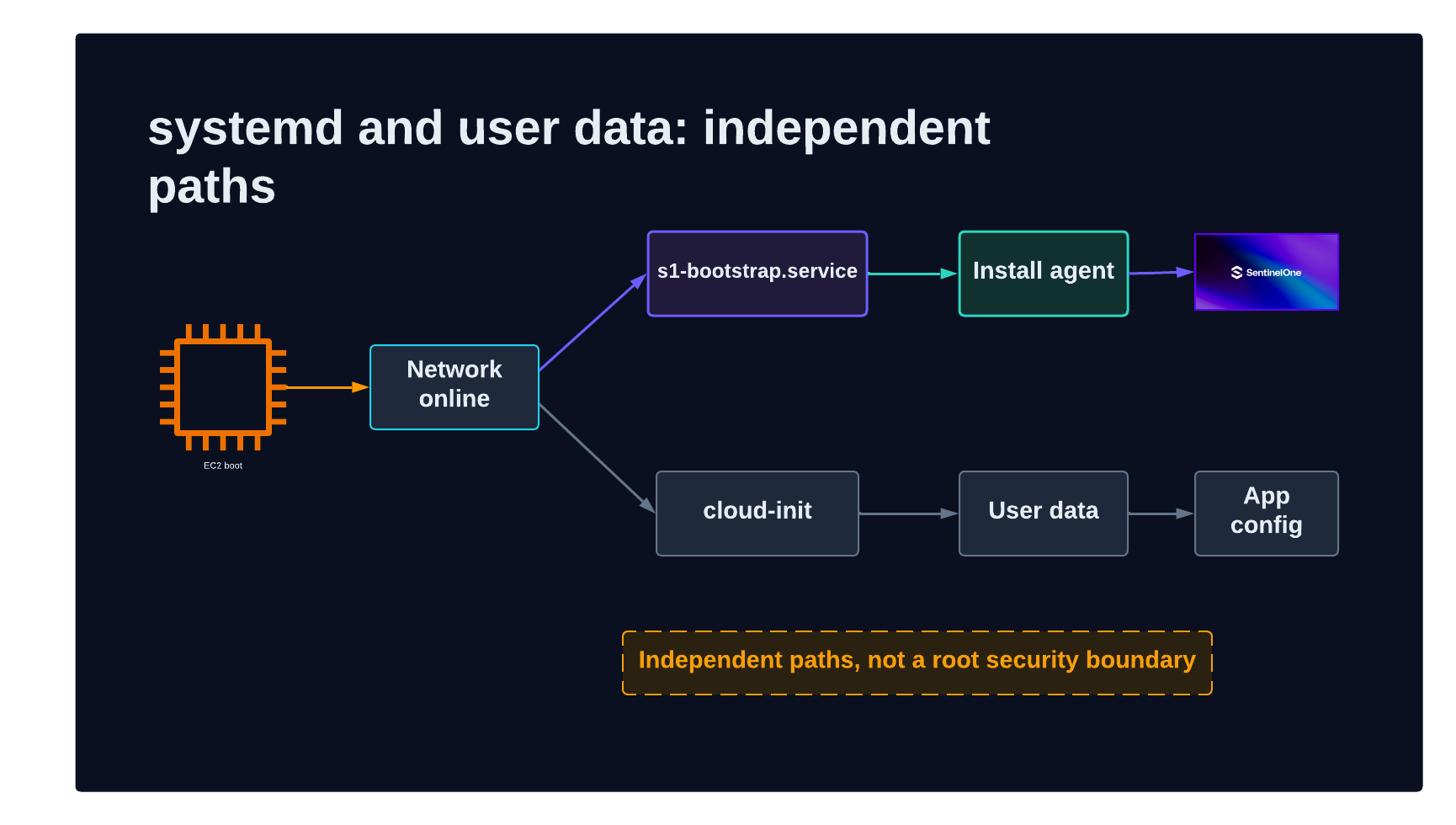
The following is an abbreviated unit.
[Unit]
Description=SentinelOne agent first-boot bootstrap
ConditionPathExists=!/var/lib/s1-bootstrap/completed
After=network-online.target
Wants=network-online.target

[Service]
Type=oneshot
RemainAfterExit=yes
ExecStart=/usr/local/sbin/s1-bootstrap.sh
Restart=no
StandardOutput=journal
StandardError=journal
# Set TimeoutStartSec to a tested upper bound for your environment.

[Install]
WantedBy=multi-user.target
network-online.target is sufficient for the metadata and network operations used by this bootstrap. On Amazon Linux 2023, later cloud-init stages that process user data also run after network readiness. The two paths can therefore proceed concurrently rather than forcing every workload’s user data to wait for a security-agent package download and installation.
Systemd makes SentinelOne bootstrap independent of cloud-init and user-data customization. It does not, by itself, form a security boundary against code already authorized to execute as root. A hostile root-level user-data script can race, stop, mask, or later remove a service. Preventing that behavior requires authorization controls around RunInstances, launch templates, user data, and operating-system administration, followed by SentinelOne anti-tamper controls after enrollment.
If your policy requires the agent to finish before any user data executes, model an explicit ordering dependency and accept the resulting boot coupling. Do not assume that parallel systemd units establish a security ordering they do not declare.
First-boot lifecycle
The bootstrap is intentionally a single-attempt state machine:
- Confirm that it is running as root.
- Exit if a completion marker exists.
- Acquire a nonblocking
flocklock to prevent duplicate invocation. - Create the marker immediately to claim the attempt.
- Load configuration and establish a global retry deadline.
- Discover EC2 identity through IMDSv2.
- Load the SentinelOne API token into memory and remove its on-disk copy.
- Resolve the AWS account to one SentinelOne site.
- Retrieve the site registration token and a compatible agent package.
- Download, verify, install, register, enable, and start the agent.
- Poll management status for console connectivity.
- Write a result document, clean temporary material, finalize the marker, and disable the bootstrap unit on every exit path.
The single-attempt behavior is intentional. It prevents repeated registration attempts, repeated use of a bootstrap credential, and an uncontrolled boot loop. It also means failures require monitoring and an explicit remediation runbook; a reboot is not a retry mechanism.
Serialize execution and claim the attempt
Create the completion marker before making remote calls. If the instance is forcibly stopped after the token is removed, the next boot must not rerun with an absent credential and produce a misleading second failure.
STATE_DIR=/var/lib/s1-bootstrap
MARKER="${STATE_DIR}/completed"
LOCK="${STATE_DIR}/lock"

if [ -e "$MARKER" ]; then
  systemctl disable s1-bootstrap.service >/dev/null 2>&1
  exit 0
fi

exec 9>"$LOCK"
flock -n 9 || exit 0

printf 'started=%s\n' "$(date -u +%Y-%m-%dT%H:%M:%SZ)" > "$MARKER"
trap finish EXIT
The finish handler should execute on success and ordinary failure. It writes a final status, removes temporary files, disables the service, and makes the result available to operations tooling.
Discover the AWS account with IMDSv2
The AWS account is the routing key between the AWS and SentinelOne control planes. Obtain it from the EC2 instance identity document through IMDSv2.
IMDS=http://169.254.169.254

IMDS_TOKEN="$(curl -fsS -X PUT \
  "${IMDS}/latest/api/token" \
  -H 'X-aws-ec2-metadata-token-ttl-seconds: 300')"

IDENTITY_DOCUMENT="$(curl -fsS \
  -H "X-aws-ec2-metadata-token: ${IMDS_TOKEN}" \
  "${IMDS}/latest/dynamic/instance-identity/document")"

AWS_ACCOUNT_ID="$(jq -r '.accountId // empty' <<<"$IDENTITY_DOCUMENT")"
AWS_REGION="$(jq -r '.region // empty' <<<"$IDENTITY_DOCUMENT")"
INSTANCE_ID="$(jq -r '.instanceId // empty' <<<"$IDENTITY_DOCUMENT")"
INSTANCE_ARCH="$(jq -r '.architecture // empty' <<<"$IDENTITY_DOCUMENT")"

test -n "$AWS_ACCOUNT_ID" || {
  echo "FATAL: account identity is unavailable" >&2
  exit 1
}
Require IMDSv2 in the AMI or launch template rather than silently falling back to IMDSv1. See Configure the Instance Metadata Service options for account-level and launch-time controls.
This identity document is used for placement, not as proof to an external security boundary. If you replace the embedded token with an identity broker, validate the signed EC2 identity document and establish replay protection before issuing short-lived registration material.
The bootstrap maps x86_64 and aarch64 to the package architecture names expected by the SentinelOne API. Build and canary-test a separate AMI for every processor architecture you support; package-selection logic alone does not make an x86 AMI bootable on Arm.
Handle the API token deliberately
The token stored in the AMI belongs to a dedicated SentinelOne service user. Load it once, attempt to remove the file before the first network request, and never expose it in a process argument.
TOKEN_FILE=/etc/s1-bootstrap/api-token

test -s "$TOKEN_FILE" || {
  echo "FATAL: API token is missing" >&2
  exit 1
}

S1_API_TOKEN="$(tr -d '[:space:]' < "$TOKEN_FILE")"
shred -u -n 3 "$TOKEN_FILE" 2>/dev/null || rm -f "$TOKEN_FILE"
On an EBS-backed, copy-on-write storage stack, shred cannot guarantee physical erasure. Treat this as best-effort removal from the launched instance’s filesystem, not deletion from the immutable source AMI snapshot.
The bootstrap passes the authorization header to curl through a configuration stream on standard input. This avoids exposing the bearer token through /proc/<pid>/cmdline while requests or a large package download are in progress.
api_get() {
  local path="$1"

  printf 'header = "Authorization: ApiToken %s"\n' "$S1_API_TOKEN" \
    | curl -fsS -K - \
        -H 'Accept: application/json' \
        "${S1_CONSOLE_URL}${path}"
}
A production helper also needs bounded retries, exponential backoff for transient failures, explicit handling for authentication and authorization failures, HTTP status capture, pagination, and response-shape validation. Do not retry a rejected credential until the global installation timeout expires.
Resolve the AWS account to a SentinelOne site
The design uses SentinelOne dynamic groups as the account-to-site mapping system. Each dynamic group has a filter, and the relevant filter field contains one or more AWS account identifiers. The bootstrap retrieves all candidate groups and filters, joins them by filter ID, and evaluates the current instance’s account.
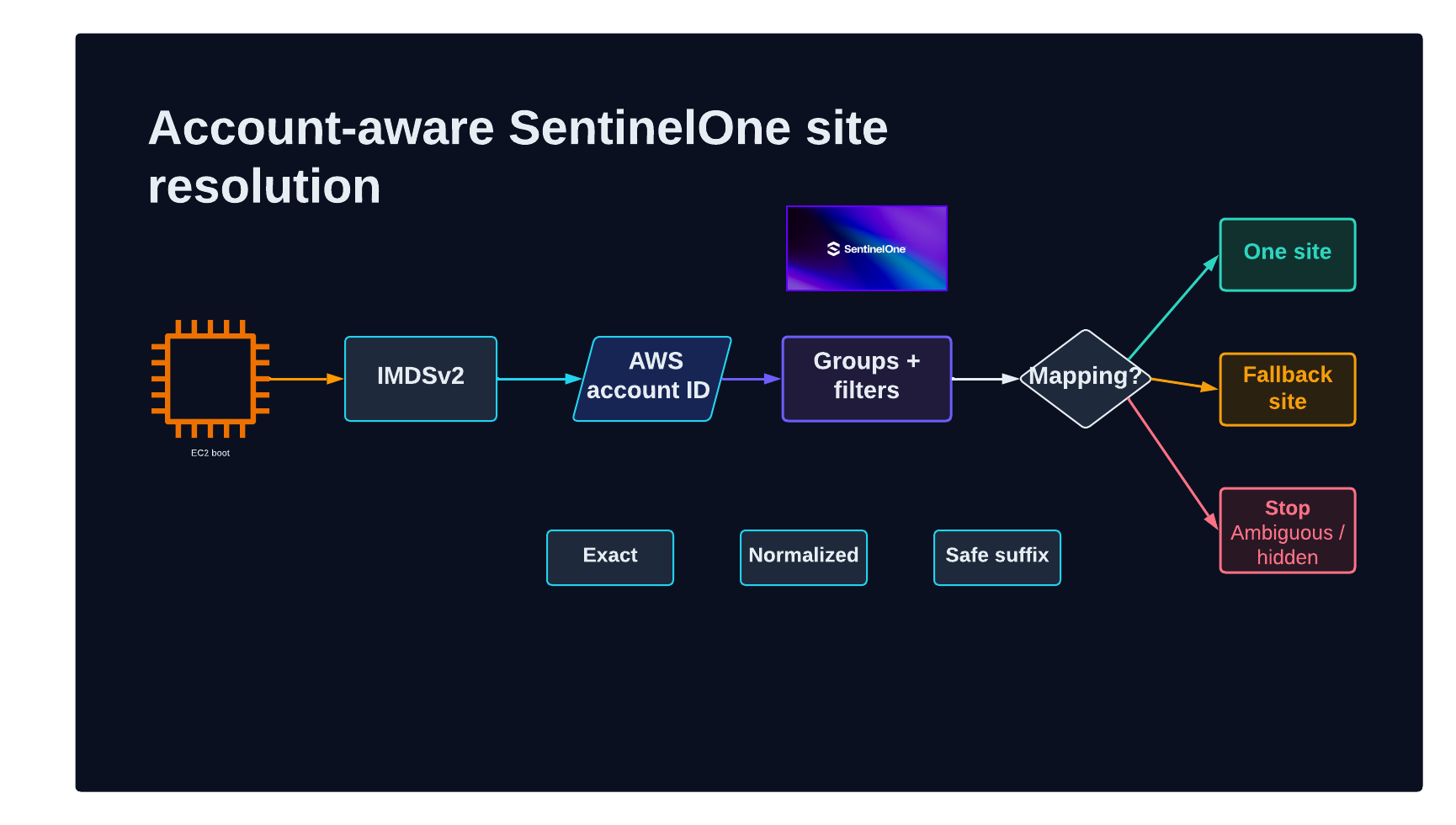
The tested implementation queries these API resources:
GET /web/api/v2.1/groups?type=dynamic
GET /web/api/v2.1/filters
GET /web/api/v2.1/sites?siteIds=<resolved-site-id>
GET /web/api/v2.1/update/agent/packages?...filters...
GET /web/api/v2.1/update/agent/download/<site-id>/<package-id>
The service user’s least-privilege permissions are:
| SentinelOne area | Permission | Bootstrap requirement |
|---|---|---|
| Sites | View | Read site metadata and its registration token |
| Groups | View | Enumerate dynamic groups and relate filter IDs to site IDs |
| Agent Packages | View | List and download an appropriate installer |
| Endpoints | View | Read filter definitions used by the dynamic groups |
The API token must have the required visibility across every candidate site. A token missing Endpoints view access for one site can still receive successful responses while filters from that site are absent. Treating an incomplete response as “no match” could silently route an instance to the fallback site.
To detect that condition, compare every dynamic group’s non-null filter ID with the returned filter IDs. If filters are missing and no account match is found, stop rather than treating the mapping as authoritative. A higher-assurance policy can fail whenever any candidate filter is unavailable, because an omitted filter could conceal a conflicting match.
Use deterministic match tiers
Some systems normalize an account identifier by removing leading zeroes. The resolver therefore evaluates mappings in ordered tiers:
- Exact 12-digit account ID.
- Exact value after leading-zero normalization.
- A constrained account suffix of sufficient length to handle partial normalization without accepting short, collision-prone fragments.
Exact matches always take precedence. After selecting the highest available tier, reduce matches to unique site IDs.
if [ "$SITE_COUNT" -eq 1 ]; then
  SITE_ID="$(jq -r '.sites[0]' <<<"$MATCH_RESULT")"
elif [ "$SITE_COUNT" -eq 0 ] && [ "$UNREADABLE_FILTERS" -gt 0 ]; then
  fatal "site mapping is incomplete because filters were not visible"
elif [ "$SITE_COUNT" -eq 0 ]; then
  SITE_ID="$FALLBACK_SITE_ID"
  MATCH_TIER=fallback
  warn "no account mapping found; using the coverage fallback"
else
  fatal "account maps to multiple SentinelOne sites"
fi
The fallback is a deliberate availability decision: protecting an instance in a fallback site is preferable to leaving it without an agent. Emit a prominent operational signal whenever fallback occurs so the account mapping can be corrected. Do not use fallback when the result is untrustworthy because API permissions hid filters, or when conflicting filters resolve the account to multiple sites.
This approach avoids rebuilding an AMI when accounts are added or reorganized. Update the SentinelOne dynamic-group mapping, and every subsequent first boot uses the new placement decision.
Select and install the agent package
After resolving the site, the bootstrap reads its registration token and requests GA Linux RPM packages for the instance architecture. The SentinelOne API may return several versions.
Do not sort version strings lexicographically: a string beginning with 9 can sort after one beginning with 26. Split numeric version components and sort the arrays numerically.
PACKAGE="$(jq -c '
  map(. + {
    numericVersion: ((.version // "0")
      | split(".")
      | map(tonumber? // 0))
  })
  | sort_by(.numericVersion)
  | last // empty
' <<<"$PACKAGES_JSON")"

test -n "$PACKAGE" || fatal "no compatible GA Linux RPM is available"
Download the selected package with the API token supplied through curl standard input, as shown earlier. Keep it in the root-owned state directory and remove any partial file before a retry.
Validate the byte count and vendor-provided digest before installation. If the package API supplies only SHA-1, the comparison can detect accidental truncation or mismatch but should not be treated as a modern software-authenticity guarantee. Import the trusted SentinelOne package-signing key through an approved process and verify the RPM signature according to current vendor guidance. TLS, a vendor API digest, and a package signature address different parts of the supply chain.
Install the package and validate postconditions rather than trusting the package manager’s exit code alone.
INSTALL_OUTPUT="$(rpm -i "$STAGED_RPM" 2>&1)" || {
  printf '%s\n' "$INSTALL_OUTPUT" >&2
  fatal "agent RPM installation failed"
}

if grep -q 'scriptlet failed' <<<"$INSTALL_OUTPUT"; then
  warn "the RPM post-install scriptlet reported a failure"
fi

SENTINELCTL=/opt/sentinelone/bin/sentinelctl
test -x "$SENTINELCTL" || fatal "sentinelctl is missing after installation"
The post-install scriptlet normally places and enables the SentinelOne systemd unit. Enable it again idempotently to make the desired state explicit, set the site registration token, and start the agent.
"$SENTINELCTL" management token set "$SITE_REGISTRATION_TOKEN"
systemctl enable sentinelone.service
"$SENTINELCTL" control start
Scrub the registration token from captured command output before writing to journald or the bootstrap log. If the vendor CLI accepts the registration token only as an argument, it can briefly appear in the process command line; restrict local process visibility and use a vendor-supported standard-input or file-based option if one becomes available. Then poll sentinelctl management status until it reports connectivity or the tested connectivity window expires.
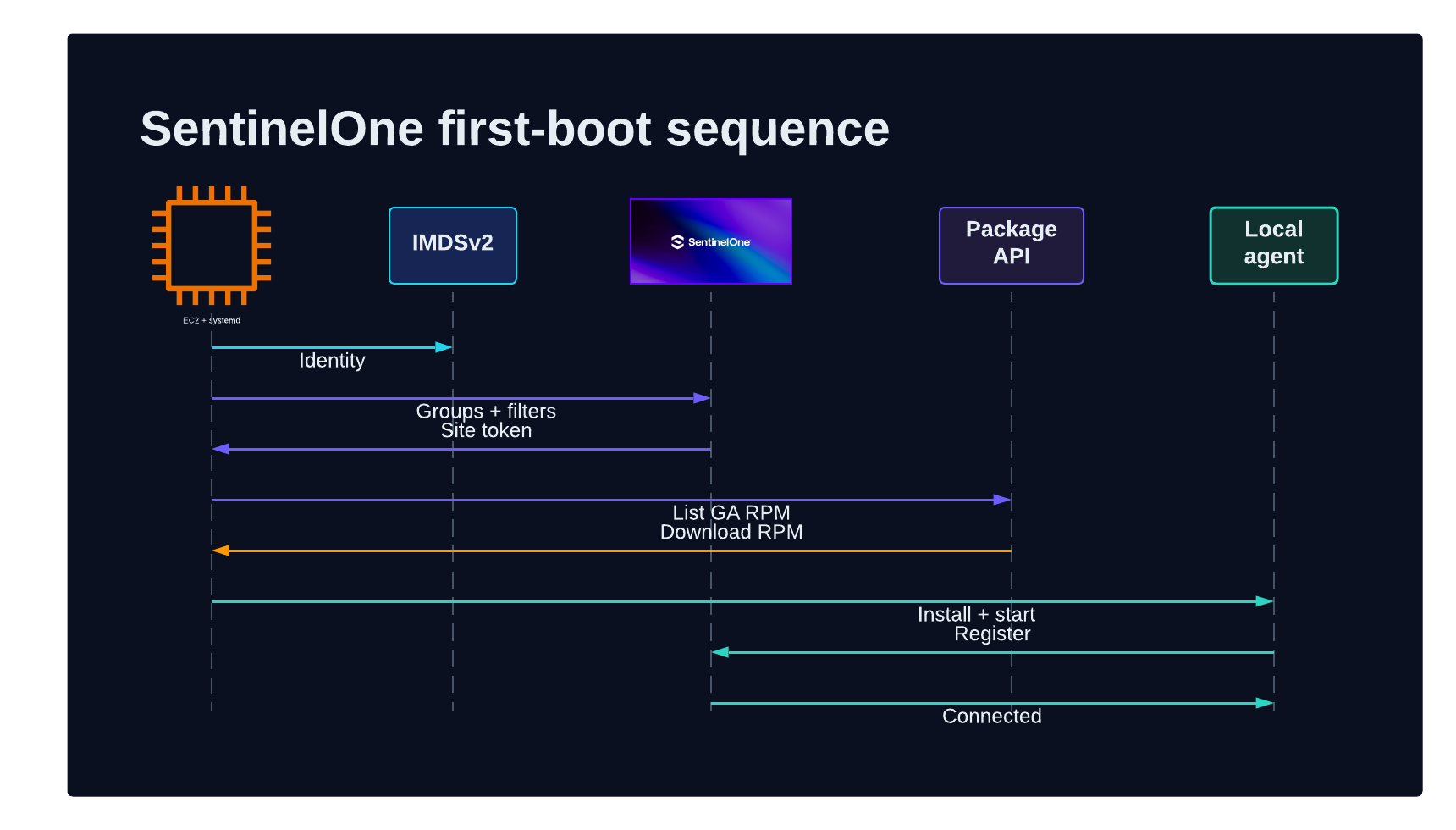
A connectivity timeout does not necessarily mean installation failed. Record a distinct SUCCESS_UNCONFIRMED state when installation, registration, and autostart are complete but the console connection is not yet visible. Operations can distinguish that condition from a package or registration failure.
Finish exactly once and leave evidence
Every ordinary exit path runs the same teardown handler. It should:
- Remove the SentinelOne API token if it still exists.
- Delete the staged RPM.
- Write a structured result file.
- Replace the provisional marker with final status.
- Disable the bootstrap service.
- Emit one concise final line to journald and the private log.
The following result structure is suitable for collection by an observability agent or a later Systems Manager inventory process. Do not include credentials or registration tokens.
{
  "status": "SUCCESS",
  "detail": "agent installed and registered",
  "run_id": "<run-id>",
  "finished_at": "<timestamp>",
  "aws_account_id": "<account-id>",
  "aws_region": "<region>",
  "instance_id": "<instance-id>",
  "s1_site_id": "<site-id>",
  "s1_site_name": "<site-name>",
  "s1_group_names": "<dynamic-group>",
  "match_tier": "exact",
  "agent_version": "<agent-version>"
}
Because failure also consumes the one attempt, alert on FAILED, SUCCESS_UNCONFIRMED, and fallback results. A remediation runbook can correct connectivity or mapping, inject fresh bootstrap authorization, remove the marker, and explicitly re-enable the unit. Do not instruct operators to recover and reuse the original token from the AMI.
Representative log
The following is a shortened and anonymized representative log from an EC2 instance that installed the SentinelOne agent:
s1-bootstrap starting
host: Linux <kernel> <architecture>   os: Linux

--- step 1: instance identity via IMDSv2 ---
account=<account-id> region=<region> instance=<instance-id> arch=<architecture>
selecting SentinelOne package architecture

--- step 2: load API token ---
API token loaded into memory
API token file removed from disk

--- step 3: resolve AWS account to a SentinelOne site ---
fetched <count> dynamic groups
fetched <count> filters
match tier=exact
matched group=<dynamic-group> site=<site-id>

--- step 4: fetch site registration token ---
resolved site=<site-name> state=active

--- step 5: select agent package ---
console offers <count> compatible GA Linux RPM packages
selected package=<package-name> version=<agent-version>

--- step 6: download and verify installer ---
download completed
size verified
digest verified

--- step 7: install agent ---
rpm installation completed
sentinelctl present version=<agent-version>

--- step 8: register agent ---
registration token accepted

--- step 9: enable and start ---
agent unit enabled
agent started

--- step 10: verify connectivity ---
Connectivity On

RESULT status=SUCCESS account=<account-id> site=<site-name> \
group=<dynamic-group> tier=exact agent=<agent-version>
unit disabled and completion marker written
The full diagnostic path is /var/log/s1-bootstrap.log; systemd output is also available through journalctl -u s1-bootstrap.service. Restrict the detailed log to root because vendor command output and environment metadata can contain sensitive operational context even after explicit token redaction.
Scale across AWS accounts and Regions
The bootstrap does not need account-specific image variants. EC2 Image Builder can apply AMI launch permissions to AWS Organizations organizations or OUs, and all child accounts beneath a shared OU gain access. This allows account vending and OU placement to control image availability without adding every account ID to every AMI.
For each approved Region:
- Produce or copy a region-local encrypted AMI.
- Use a customer-managed KMS key and key policy appropriate for the sharing model.
- Apply the intended organization or OU launch permissions.
- Publish the region-local AMI ID through your organization’s normal discovery mechanism, such as an approved SSM parameter, launch template, or service catalog.
- Launch a canary and verify both SentinelOne installation and correct-site placement before promotion.
AWS documents the available Region, encryption, sharing, copying, launch-template, and SSM publication settings in Create and update AMI distribution configurations.
The embedded-token implementation performs no regional AWS API call after launch. IMDSv2 is link-local, and SentinelOne API traffic goes to the configured vendor endpoint. As a result, the same bootstrap operates in any Region where the AMI, networking, architecture, and SentinelOne support requirements are satisfied.
This does not make the AMI global, and it does not remove regional dependencies from other token-delivery designs. Parameter Store and Secrets Manager are regional services; runtime retrieval must call a reachable Region containing an authorized parameter or secret.
Choose a token-delivery model
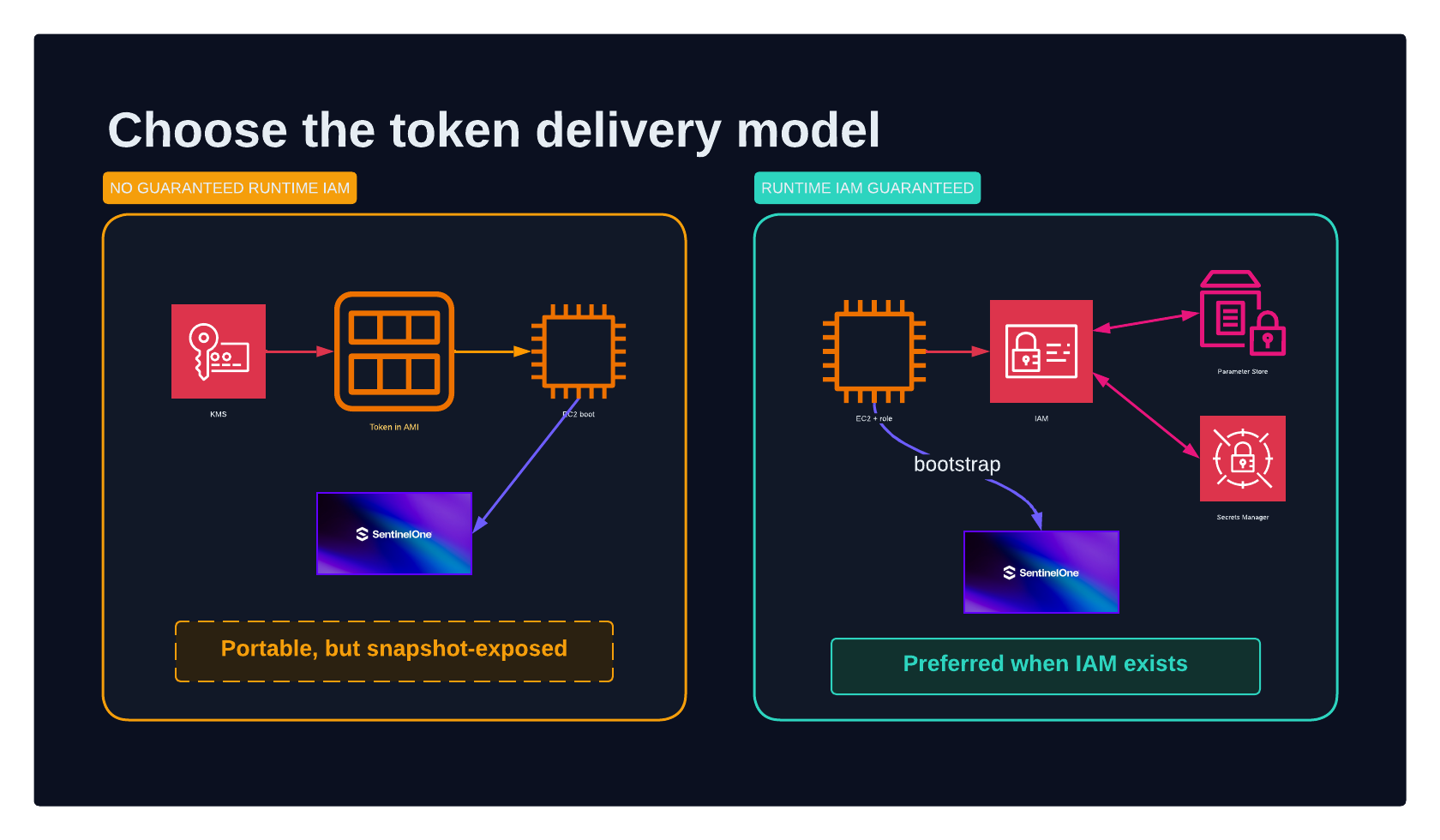
Embedding a credential was selected for this implementation because the platform cannot guarantee that every future EC2 instance will have an IAM instance profile with Parameter Store or Secrets Manager permissions. The bootstrap must work in any approved account and Region immediately after launch, even when application teams control the instance profile.
That reliability comes with a significant risk: the API token is part of the AMI snapshot. Encrypting the AMI protects data at rest and allows KMS policy to constrain use, but a principal authorized to launch the AMI can boot or inspect its root volume and recover the token before the service removes it. Filesystem shredding on a launched volume does not erase the immutable source snapshot. Rotating the token also requires publishing a new image or another coordinated replacement mechanism.
Reduce exposure in the embedded model:
- Use a dedicated SentinelOne service user with only Sites, Groups, Agent Packages, and Endpoints view permissions.
- Encrypt every AMI and snapshot with an approved customer-managed KMS key.
- Restrict AMI launch and KMS decrypt permissions to the intended organization boundaries and workload roles.
- Segment credentials by security domain where the mapping design permits it.
- Keep the token file root-only, load it once, and remove it before network operations.
- Never log either the API token or site registration token.
- Rotate the credential on a documented schedule and after any AMI access-boundary incident.
- Retire old AMIs and snapshots promptly after rotation.
- Monitor vendor API use for unexpected package downloads, site enumeration, or registration activity.
Prefer runtime retrieval when EC2 permissions are guaranteed
If every target instance can be required to use a controlled IAM role, do not put the SentinelOne API token in the AMI. Bake only nonsecret lookup metadata, such as a complete parameter or secret ARN, and retrieve the token at first boot.
Cross-account access requires more than an identity policy:
- Parameter Store: use an Advanced SecureString encrypted by a customer-managed KMS key, share it through AWS Resource Access Manager (AWS RAM) or an appropriate parameter resource policy, authorize the workload role, and use the full owner-account parameter ARN. Parameter Store has no native cross-Region replication, so the platform must replicate and reconcile regional parameters or deliberately accept a cross-Region dependency.
- Secrets Manager: attach a resource policy to the secret, authorize the workload role and customer-managed KMS key, and create regional replicas when local availability is required. Each replica Region needs correct KMS and IAM authorization.
In both cases, constrain access with the organization ID, OU path where appropriate, expected role path, exact resource ARNs, kms:ViaService, and encryption context. An SCP, permissions boundary, session policy, or VPC endpoint policy can still deny the request, so test the complete first-boot access path from a representative member account.
For a detailed comparison and tested CLI walkthrough, see Sharing Secrets Across an AWS Organization with SSM Parameter Store and Secrets Manager: RAM, KMS, and Regional Replication. AWS also provides guidance for Parameter Store cross-account sharing and cross-account Secrets Manager resource policies.
The preferred long-term design is stronger than either static-secret location: exchange a validated AWS identity for a short-lived, single-use, site-specific registration credential. If SentinelOne or an internal broker supports that model, it reduces the blast radius and decouples token rotation from AMI publication.
Build and promotion validation
A successful Image Builder state means the image workflow completed; it does not prove that a deferred first-boot agent enrolled correctly. Use two validation layers.
Build-time negative and positive assertions
Before image capture, verify all of the following:
# Bootstrap assets are ready.
test -x /usr/local/sbin/s1-bootstrap.sh
bash -n /usr/local/sbin/s1-bootstrap.sh
test -s /etc/s1-bootstrap/config
test "$(stat -c %a /etc/s1-bootstrap/api-token)" = 600
systemctl is-enabled s1-bootstrap.service

# No SentinelOne endpoint identity exists in the image.
test ! -e /opt/sentinelone/bin/sentinelctl
! rpm -qa | grep -qi sentinel
! systemctl list-unit-files | grep -qi '^sentinelone\.service'
test ! -e /var/lib/s1-bootstrap/completed
These checks ensure that the bootstrap is present and armed while the agent itself is absent.
First-boot canary assertions
Launch an instance from the candidate AMI in a representative account and Region. Confirm:
- The result status is
SUCCESSor an explicitly accepted transitional status. - The AWS account maps to the expected SentinelOne site and dynamic group.
- The endpoint appears in the SentinelOne console with a unique UUID.
- The selected agent architecture and version are correct.
sentinelone.serviceis enabled and running.- Management connectivity reports
On. - The bootstrap API-token file and staged RPM no longer exist.
- The bootstrap unit is disabled and the completion marker is final.
- Rebooting does not rerun the bootstrap.
- Application user data can run in parallel without corrupting agent installation.
Repeat this canary for every supported processor architecture and for enough account/site boundaries to exercise exact mapping, fallback mapping, and ambiguity detection. Repeat it in each promoted Region when regional networking, proxies, KMS policy, or AMI-copy behavior differs.
Promote or publish the AMI ID only after the canary succeeds. This avoids advertising an Image Builder output that is structurally valid but cannot reach the SentinelOne control plane from real workload networks.
Operational considerations
Treat fallback as covered but misclassified
The fallback site prioritizes endpoint coverage. It should generate an alert or inventory finding so the platform team can add the missing account mapping. Track fallback age and volume; otherwise the fallback becomes an ungoverned permanent destination.
Fail closed on ambiguous or incomplete mappings
Fallback is appropriate for a genuinely unmapped account. It is not appropriate when multiple sites match or the API token could not see all relevant filters. Those conditions indicate a control-plane integrity problem, and guessing can register an endpoint into the wrong security boundary.
Separate retryable and permanent errors
Retry transient network failures and server errors within a global deadline. Stop immediately for rejected credentials, malformed responses, unsupported architectures, conflicting mappings, integrity failures, and missing post-install artifacts. This keeps first boot bounded while avoiding wasteful retries for configuration defects.
Control agent-version drift
Selecting the latest GA package at first boot keeps new instances current, but it also means two instances launched from the same AMI at different times can receive different agent versions. Treat that as an explicit release policy. For stronger determinism, place an approved version or version range in nonsecret configuration, canary each newly approved package, and alert when the vendor API no longer offers the expected version.
Design proxy and egress behavior explicitly
The instance must reach the SentinelOne API and package service. If private subnets require a proxy, make the proxy configuration part of the nonsecret bootstrap configuration and test package downloads at realistic size. Avoid making security coverage depend on application user data configuring the proxy after the bootstrap has already started.
Control diagnostic sensitivity
Token values must never enter logs. Even without tokens, logs can expose account IDs, instance IDs, site names, dynamic-group names, agent versions, and control-plane URLs. Store detailed logs with root-only permissions, forward only required fields, and apply retention and access controls suitable for security telemetry.
Plan explicit recovery
Because the unit never retries automatically, document how an operator determines the failure class, supplies fresh authorization, safely resets state, and reruns the service. Require an auditable action rather than encouraging ad hoc deletion of the marker.
Cleanup and credential rotation
This post creates no standalone resources, but implementing the pattern creates credentials and image versions that require lifecycle management.
- Rotate the SentinelOne API service-user token and rebuild candidate AMIs.
- Revoke credentials immediately after suspected AMI or snapshot exposure.
- Remove obsolete AMI launch permissions before deregistration where required by policy.
- Deregister superseded AMIs and delete their snapshots according to retention requirements.
- Remove stale regional copies and discovery references.
- Keep at least one known-good rollback image whose credential status and SentinelOne compatibility are understood.
- Audit dynamic-group filters when AWS accounts move between OUs or security domains.
Conclusion
A golden AMI should standardize software and policy without cloning endpoint identity. By baking a one-shot systemd bootstrap instead of an installed SentinelOne agent, each EC2 instance can create its own agent state at first boot. IMDSv2 supplies the AWS account identity, SentinelOne dynamic groups resolve that identity to a site, and the vendor API supplies a compatible package and registration token.
AWS Organizations and EC2 Image Builder scale the image supply plane across accounts, while region-local AMI copies extend it across Regions. The bootstrap remains the same because runtime routing depends on instance identity rather than the account or Region in which the image was originally built.
Embedding a long-lived API token makes this mechanism independent of workload IAM, but it moves the AMI itself into the credential trust boundary. Use encryption, least privilege, strict AMI access, rotation, and retirement controls. When runtime AWS permissions can be guaranteed, prefer cross-account Parameter Store or Secrets Manager retrieval—or, better, an identity-attested exchange for short-lived registration material.
The durable principle is simple: bake the installer and its policy, create endpoint identity after launch, and validate the complete first-boot path before promoting the image.
References
- How EC2 Image Builder works
- Create and update AMI distribution configurations
- Share an AMI with organizations and organizational units
- Configure the Instance Metadata Service options
- Introducing Parameter Store cross-account sharing
- Access Secrets Manager secrets across AWS accounts using resource-based policies
- Sharing Secrets Across an AWS Organization with SSM Parameter Store and Secrets Manager
 Linkedin