






Centralize and Operationalize Security Data with AWS Security Lake


Table of Contents
- Introduction
- What is AWS Security Lake?
- Architecture Overview of AWS Security Lake Setup
- Prerequisites
- Step-by-Step Setup of AWS Security Lake
- Integration with Security Services
- Querying AWS Security Lake with Amazon Athena
- Why Athena + Security Lake is Powerful
- Visualization with Amazon QuickSight
- Cost Estimation
- Security Best Practices
- Conclusion & Next Steps
- About the Author
Introduction
In the evolving world of cloud security, detecting threats and remediating issues is no longer enough. Organizations need visibility — actionable, unified, and real-time — to understand their security posture and make informed decisions. This is where centralized security data lakes become invaluable.
Having walked through detection (Blog 1), multi-service integration (Blog 2), remediation (Blog 3), and deployment automation (Blog 4), this blog focuses on operationalizing all that data. We’ll dive into AWS Security Lake, a fully managed service that aggregates, normalizes, and stores security logs from multiple AWS services, partners, and custom sources.
This practical guide will walk you through setting up AWS Security Lake, integrating with existing AWS security services, and querying the data using Amazon Athena to derive insights. Whether you’re a cloud security engineer, DevSecOps practitioner, or compliance analyst, this blog will equip you to turn raw logs into security intelligence.
What is AWS Security Lake?
AWS Security Lake is a fully managed service that automatically centralizes security data from cloud, on-premises, and third-party sources into a purpose-built data lake stored in your Amazon S3 account. It transforms and normalizes incoming log data using the Open Cybersecurity Schema Framework (OCSF), making it easier to analyze with tools like Amazon Athena, OpenSearch, and third-party SIEMs.
Key Benefits:
- Centralization: Consolidates security data from various AWS services and third-party tools.
- Normalization: Converts logs into a consistent OCSF schema for seamless analysis.
- Query Ready: Automatically integrates with AWS Glue and Amazon Athena to allow SQL-based queries.
- Cost Efficiency: Built on Amazon S3 for cost-effective storage with native lifecycle policies.
- Security-Aware: Supports encryption, IAM controls, Lake Formation for data access management.
Supported AWS Sources:
- Amazon VPC Flow Logs
- AWS CloudTrail
- AWS Route 53 Resolver Query Logs
- AWS GuardDuty
- AWS IAM Access Analyzer
- Amazon Macie
- AWS Security Hub
Custom and Third-Party Sources:
- You can ingest logs from partner sources like CrowdStrike, Okta, etc., or even create custom log ingestion via APIs.
Use Cases:
- Threat hunting and correlation
- Compliance auditing and investigation
- Forensics and root cause analysis
- Dashboarding and alerting
Architecture Overview of AWS Security Lake Setup
Architecture Overview
The architecture of AWS Security Lake revolves around a unified data pipeline that aggregates logs from multiple AWS services and third-party integrations into a central Amazon S3 bucket. Here’s a conceptual flow of how the system is designed:
- Data Sources (e.g., GuardDuty, CloudTrail, VPC Flow Logs, Macie, CrowdStrike) emit logs.
- Security Lake Ingestion collects these logs and transforms them into OCSF format.
- Amazon S3 serves as the central storage location, logically partitioned per source, region, and log type.
- AWS Glue Data Catalog automatically catalogs the normalized logs.
- Amazon Athena can be used to query the logs using SQL.
- Optional Integrations: You can integrate this with SIEMs (like Splunk or QRadar), or OpenSearch for full-text search and dashboards.
- Lake Formation & IAM manage fine-grained access control on log data.
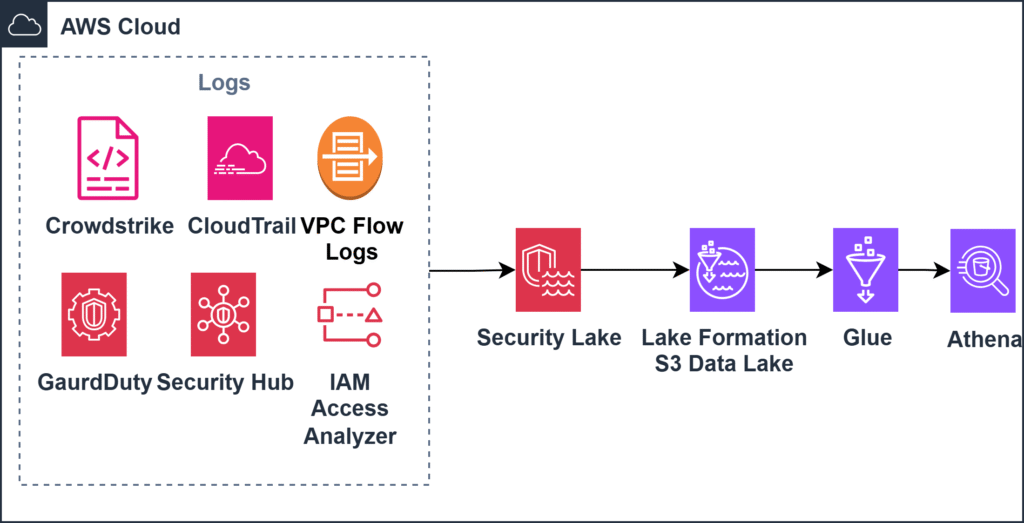
This architecture is modular, secure, and scalable — supporting multi-account, multi-region environments for enterprise-scale operations.
Prerequisites
Before setting up AWS Security Lake, ensure the following:
- You have administrative access in the AWS Management Console.
- Your account is operating in a supported AWS region.
- Services like CloudTrail, GuardDuty, and Macie are already enabled or ready to be configured.
- You have permissions to configure IAM roles, Lake Formation policies, and Glue Data Catalogs.
Step-by-Step Setup of AWS Security Lake
Let’s now dive into the step-by-step process of setting up AWS Security Lake in your environment.
Step 1: Enable Security Lake in Your Account
- Go to the AWS Security Lake Console.
- Click Get Started.
- Choose the regions where you want to enable data collection.
- Select the data sources (e.g., CloudTrail, GuardDuty, VPC Flow Logs).
- Configure the S3 bucket or use the default one created by the service.
- Enable the Automatic Partitioning and Lake Formation Permissions.
Step 2: Enable OCSF Normalization
- Ensure that “OCSF Normalization” is enabled to standardize logs across services.
- This allows for easier correlation and querying using Athena or external tools.
Step 3: Grant Data Access Using Lake Formation
- Use Lake Formation to define access to the log data.
- Create data lake administrators and grant table-level permissions using IAM roles or users.
- Restrict sensitive log types (e.g., Macie) to only security/compliance roles.
Step 4: Enable Cross-Account Ingestion (Optional)
- If managing a multi-account setup, designate one account as the admin and others as contributors.
- Security Lake will then aggregate logs from contributor accounts into the admin account’s central S3 bucket.
- Use AWS Organizations integration for simplified setup.
Step 5: Validate Data Ingestion
- After enabling, go to Amazon S3 → Security Lake bucket → Check OCSF-formatted folders.
- Use AWS Glue console to view automatically created databases and tables.
- Launch Amazon Athena, select the Security Lake database, and try running a sample query:
SELECT * FROM cloudtrail LIMIT 10;Integration with Security Services
Once AWS Security Lake is enabled, it becomes the central hub for security data across your AWS environment. Here’s how it integrates seamlessly with other AWS security services:
| Service | Integration Method | Benefits |
|---|---|---|
| CloudTrail | Native integration — logs are normalized into OCSF format. | Enables forensic investigations, compliance tracking, and detection of unauthorized actions. |
| GuardDuty | Ingests threat detection findings automatically. | Correlate with VPC and CloudTrail logs for deeper analysis. |
| Macie | Automatically shares sensitive data findings into Security Lake. | Centralize S3 data classification reports and analyze with Athena. |
| VPC Flow Logs | Added as a source — becomes part of centralized lake. | Enables traffic analysis, anomaly detection, and cross-service correlation. |
| Route 53 Resolver | DNS query logs are normalized and ingested. | Useful for detecting data exfiltration or suspicious domain access. |
| IAM Access Analyzer | Findings are collected and available via Glue/Athena. | Understand access anomalies and conduct permission reviews. |
| Security Hub | Sends normalized findings into the Lake. | Correlate with upstream sources like GuardDuty or Macie for contextual investigations. |
These integrations turn Security Lake into a powerful central analytics and compliance platform, ensuring every detection has context and traceability.
Querying AWS Security Lake with Amazon Athena
Once AWS Security Lake is configured and log ingestion has started, the real value comes from querying and analyzing this data. Amazon Athena enables you to run interactive SQL queries directly against the logs stored in Amazon S3 — without any need for ETL or infrastructure setup.
Step-by-Step: Explore Your Security Data with Athena
Step 1: Navigate to Amazon Athena
- Go to the AWS Console → Search for Athena.
- Ensure you are in the same region where Security Lake is enabled.
- Select the Security Lake Glue Catalog database (usually named something like
amazon_security_lake_glue_db_<region>).
Step 2: Browse Available Tables
- Tables will be automatically generated for each log source — e.g.,
cloudtrail,vpcflow,guardduty,macie, etc. - Click on a table to preview the schema.
Step 3: Run Sample Queries
Here are a few example queries to get you started:
Query 1: Find Recent Unauthorized API Calls
SELECT eventtime, eventname, useridentity.type, sourceipaddress
FROM cloudtrail
WHERE errorcode = 'AccessDenied'
ORDER BY eventtime DESC
LIMIT 25;
Query 2: List GuardDuty Findings in the Last 7 Days
SELECT title, severity, description, service.archived, updatedat
FROM guardduty
WHERE service.archived = false
AND updatedat > current_timestamp - interval '7' day
ORDER BY severity DESC;
Query 3: Identify Publicly Accessible S3 Buckets Detected by Macie
SELECT bucketname, objectcount, classificationdetails.result
FROM macie
WHERE classificationdetails.result LIKE '%Public%';
Query 4: List Top Source IPs from VPC Flow Logs
SELECT sourceaddress, COUNT(*) AS connections
FROM vpcflow
GROUP BY sourceaddress
ORDER BY connections DESC
LIMIT 10;
Step 4: Save and Share Queries
- Athena allows you to save your queries and organize them under Workgroups.
- You can also export query results to S3 or plug them into dashboards via QuickSight or OpenSearch.
Optional: Automate Insights
- For production environments, consider automating security analytics by scheduling Athena queries using Amazon EventBridge and AWS Lambda to process and alert on thresholds.
We can integrate other third party tools with Security Lake, CrowdStrike is one of the example.
Steps to Ingest CrowdStrike Logs into AWS Security Lake
- Collect Logs:
- Ensure CrowdStrike is configured to export logs from ECS Fargate or endpoint systems.
- Export logs to a centralized location such as CloudWatch Logs, Firehose, or via Lambda.
- Transform Logs to OCSF Format:
- Use Lambda, Fluent Bit, or containerized processes to convert logs into OCSF-compliant JSON.
- Fields like
event_type,event_timestamp,actor, andsrc_endpointmust be mapped.
- Deliver Transformed Logs to S3:
- Store these logs in an S3 bucket that matches Security Lake’s expectations.
- Register as Custom Source in Security Lake:
- Go to Custom Sources and register your bucket.
- Define schema type (OCSF) and log partitions.
- Validate and Monitor:
- Confirm ingestion in Security Lake.
- Query logs in Athena via automatically created Glue tables.
- Access Control:
- Set up fine-grained access using Lake Formation policies.
Sample Athena Query for CrowdStrike Logs (from ECS Fargate)
-- Suspicious Login Attempts from CrowdStrike ECS
SELECT event_timestamp, user_name, source_ip, event_type
FROM crowdstrike_logs
WHERE event_type = 'suspicious_login'
AND log_source = 'ecs-fargate-app'
ORDER BY event_timestamp DESC;
NOTE: CrowdStrike logs must be ingested via a supported custom ingestion connector or converted into OCSF format and stored in an S3 bucket linked with Security Lake. AWS may release native connectors in the future.
Why Athena + Security Lake is Powerful
- Instant Insights: Query billions of rows within seconds.
- No Infra Overhead: Fully serverless and ready to go.
- Scalable: Works across accounts, regions, and data volumes.
- Secure: Integrated with Lake Formation, IAM, and VPC.
Visualization with Amazon QuickSight
To make your security analysis more interactive and consumable, you can visualize the results of Amazon Athena queries using Amazon QuickSight.
Why QuickSight?
- Native integration with Athena and Glue.
- Intuitive UI for building dashboards.
- Rich set of visuals like line charts, pivot tables, and maps.
- Embed or share dashboards across teams.
Setup Steps:
- Create a QuickSight Account (if not already done):
- Go to QuickSight Console → Sign up.
- Connect QuickSight to Athena:
- In QuickSight, choose Manage Data → New Dataset.
- Select Athena, provide your workgroup and database (from Security Lake Glue catalog).
- Build Your Dataset:
- Choose tables like
cloudtrail,guardduty,macie,vpcflow, etc. - Apply filters or custom SQL to create a refined dataset.
- Choose tables like
- Create Dashboard:
- Use visuals like:
- Bar Chart: Top 10 AccessDenied Events (from CloudTrail).
- Line Chart: GuardDuty Finding Trends over Time.
- Heat Map: VPC Flow Anomalies by Region.
- Table: Macie S3 Bucket Findings by Classification.
- Configure filters for region, finding type, or log source.
- Use visuals like:
- Publish & Share:
- Share dashboards with teams.
- Embed in internal portals (if needed).
Example Visual Queries:
Top Talkers (VPC Flow Logs)
SELECT sourceaddress, COUNT(*) AS request_count
FROM vpcflow
GROUP BY sourceaddress
ORDER BY request_count DESC
LIMIT 10;
AccessDenied Events (CloudTrail)
SELECT useridentity.username, COUNT(*) AS denied_attempts
FROM cloudtrail
WHERE errorcode = 'AccessDenied'
GROUP BY useridentity.username
ORDER BY denied_attempts DESC;
GuardDuty Severity Breakdown
SELECT severity, COUNT(*) AS finding_count
FROM guardduty
GROUP BY severity
ORDER BY severity;
Optional Filters and View Segmentation
- Use dynamic parameters in QuickSight to allow filtering by:
- Region
- AWS Account ID (multi-account Security Lake)
- Log Source (e.g., Macie vs. GuardDuty)
- Time Range
- You can also create Service-specific Dashboards:
- IAM and Access Analysis
- Network Activity and Threat Detection
- S3 and Data Classification (Macie)
Cost Consideration for QuickSight:
| Plan Type | Cost |
|---|---|
| Standard (User) | ~$18/user/month |
| Reader (Session) | $0.30/session (max $5/month) |
Cost Estimation
Assumptions:
- Logs from 5 AWS services and 1 third-party source
- 30-day log retention, approx. 500 GB/month of data
| Service | Estimated Monthly Cost (USD) |
| Security Lake | $5-10 |
| S3 Storage (500 GB) | $11.50 |
| Athena Queries | $1-3 |
| Lake Formation | Included |
| Glue Catalog | Minimal (first million free) |
| CrowdStrike Logs | Based on your license |
Total Estimate: ~$20-30/month for medium-scale usage.
Security Best Practices
- Use encryption at rest (SSE-S3 or SSE-KMS).
- Enable access logging for the Security Lake S3 bucket.
- Implement fine-grained access with Lake Formation.
- Rotate IAM roles and use least privilege principles.
- Review Glue catalog permissions regularly.
Conclusion & Next Steps
AWS Security Lake delivers a unified, queryable, and cost-effective solution for security data aggregation and analysis. By integrating it with Athena and QuickSight, teams can unlock powerful insights, enhance detection, and drive compliance with confidence.
Next Steps:
- Use this setup as a foundation to automate findings triage with EventBridge and remediation pipelines.
- Explore near real-time detection using OpenSearch or Managed Grafana.
- Extend Security Lake to include more partner sources like Okta, Trend Micro, or Splunk.
- Integrate dashboards with organizational SOC workflows.
Security doesn’t stop at logging — it starts there. Let Security Lake be your intelligent source of truth.
About the Author
Deepali Sonune is a DevOps engineer with 12+ years of industry experience. She has been developing high-performance DevOps solutions with stringent security and governance requirements in AWS for 9+ years. She also works with developers and IT to oversee code releases, combining an understanding of both engineering and programming.
 Linkedin