







Upgrading & Migrating a Legacy HashiCorp Vault Cluster from Consul Backend on EC2 to Raft Backend on EKS
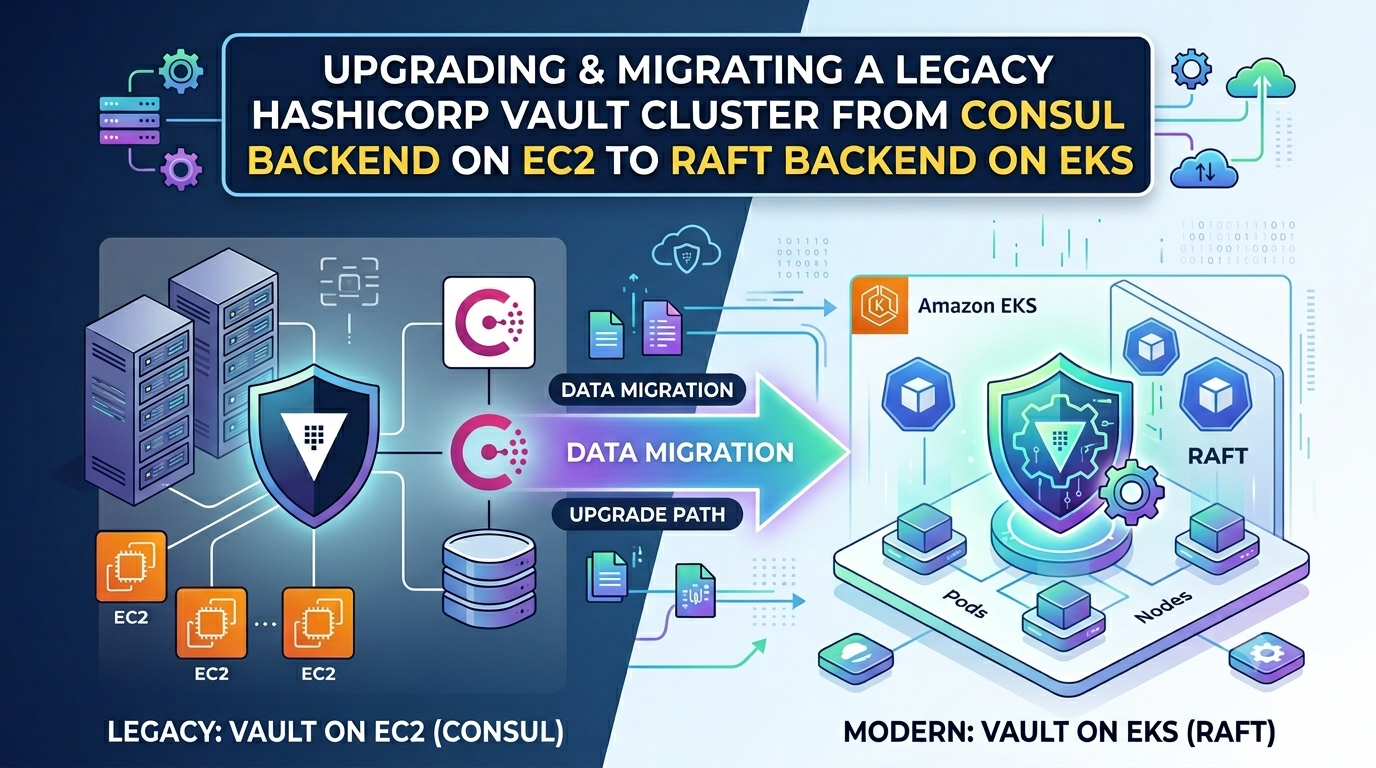
HashiCorp Vault (open source) has been our chosen secrets management solution for several years. We self-hosted & operated a Vault 1.5 cluster on AWS EC2 servers for 5+ years. Vault version 1.5 was released in July 2020 & reached end of life in June 2022. This article describes how we upgraded our Vault cluster directly from 1.5 to 1.20, while also migrating Vault data from a HashiCorp Consul backend to the now recommended Raft backend. We took this opportunity to also migrate Vault from EC2 to EKS, to ease future upgrades & build a quarterly cadence around Vault upgrades. In this case, the Vault cluster was also moving from one AWS account to another. Let’s dive in. 🚀
Pre-Work: Encryption Keys, IAM Roles & Cross-Account Access
Before deploying Vault in EKS, it needs a few resources setup outside the Kubernetes cluster. First, there’s the AWS KMS encryption key that Vault will use to encrypt data in its Raft backend. Then, there’s the IAM role that Vault pods in EKS assume to access AWS resources like the encryption key. To create these in Terraform, use:
resource "aws_kms_key" "hashicorp_vault" {
  description = "Encryption key for HashiCorp Vault in EKS"
}

resource "aws_kms_alias" "hashicorp_vault" {
  name          = "alias/hashicorp-vault-eks"
  target_key_id = aws_kms_key.hashicorp_vault.key_id
}

data "aws_caller_identity" "current" {}
data "aws_eks_cluster" "eks_cluster" {
  name = "hashicorp-vault"
}

locals {
  current_aws_account_id  = data.aws_caller_identity.current.account_id
  eks_cluster_oidc_issuer = replace(data.aws_eks_cluster.eks_cluster.identity[0].oidc[0].issuer, "https://", "")
}

module "iam_role" {
  source      = "terraform-aws-modules/iam/aws//modules/iam-role-for-service-accounts"
  name        = "hashicorp-vault-eks"
  description = "IAM role for HashiCorp Vault's EKS service account"

  use_name_prefix = false
  oidc_providers = {
    eks = {
      namespace_service_accounts = ["hashicorp-vault:hashicorp-vault"]

      provider     = local.eks_cluster_oidc_issuer
      provider_arn = "arn:aws:iam::${local.current_aws_account_id}:oidc-provider/${local.eks_cluster_oidc_issuer}"
    }
  }

  create_inline_policy = true
  inline_policy_permissions = {
    "HashiCorpVaultEncryptionKey" = {
      actions   = ["kms:DescribeKey", "kms:Encrypt", "kms:Decrypt"]
      resources = [aws_kms_key.hashicorp_vault.arn]
    }

    "HashiCorpVaultIAMAuthMethod" = {
      actions   = ["iam:Get*", "ec2:Describe*"]
      resources = ["*"]
    }
  }
}
The EKS Vault cluster will also need temporary access to the EC2 Vault’s KMS encryption key, in order to migrate Vault data from EC2 to EKS. Inspect EC2 Vault’s /etc/vault/config.hcl to identify the KMS CMK it uses. Then modify this CMK’s key policy to allow the target AWS account to use it. Also add this CMK’s ARN to the hashicorp-vault-eks IAM role’s permission policy.
Deploy HashiCorp Vault 1.20 with Raft Backend in EKS
Using Flux for GitOps, create an empty Vault 1.20 cluster in EKS as follows:
apiVersion: v1
kind: Namespace
metadata:
  name: hashicorp-vault

---

kind: HelmRepository
apiVersion: source.toolkit.fluxcd.io/v1
metadata:
  name: hashicorp
  namespace: hashicorp-vault
spec:
  interval: 1h
  url: https://helm.releases.hashicorp.com

---

kind: HelmRelease
apiVersion: helm.toolkit.fluxcd.io/v2
metadata:
  name: hashicorp-vault
  namespace: hashicorp-vault

spec:
  interval: 5m
  chart:
    spec:
      chart: vault
      version: 0.31.0 # Vault 1.20.4
      sourceRef:
        name: hashicorp
        kind: HelmRepository

  values:
    injector:
      enabled: false

    server:
      standalone:
        enabled: false
      authDelegator:
        enabled: false

      dataStorage:
        size: 64Gi
        storageClass: gp3
        mountPath: /hashicorp-vault-data

      resources:
        requests:
          cpu: 500m
          memory: 1Gi
        limits:
          cpu: 2
          memory: 4Gi

      ingress:
        enabled: true
        ingressClassName: nginx
        hosts:
        - host: vault.example.com

      serviceAccount:
        annotations:
          eks.amazonaws.com/role-arn: arn:aws:iam::<target-account-ID>:role/hashicorp-vault-eks

      ha:
        replicas: 1
        enabled: true

        raft:
          enabled: true
          setNodeId: true

          config: |
            ui = true

            disable_mlock = true
            cluster_name  = "hashicorp-vault-eks"

            max_lease_ttl     = "720h"
            default_lease_ttl = "720h"

            api_addr     = "http://127.0.0.1:8200"
            cluster_addr = "http://127.0.0.1:8201"

            service_registration "kubernetes" {}

            listener "tcp" {
              tls_disable = "true"

              address         = "0.0.0.0:8200"
              cluster_address = "0.0.0.0:8201"
            }

            seal "awskms" {
              kms_key_id = "arn:aws:kms:us-east-1:<source-account-ID>:alias/hashicorp-vault-ec2"
            }

            backend "raft" {
              path = "/hashicorp-vault-data"
            }
Wait for the Helm release to be deployed. Ensure the Vault pod is running but not ready. The reason in the pod’s events should be:
  Readiness probe failed:
  Key                      Value
  ---                      -----
  Seal Type                awskms
  Recovery Seal Type       n/a
  Initialized              false
  Sealed                   true
  Total Recovery Shares    0
  Threshold                0
  Unseal Progress          0/0
  Unseal Nonce             n/a
  Version                  1.20.1
  Build Date               2025-07-24T13:33:51Z
  Storage Type             raft
  Removed From Cluster     false
  HA Enabled               true
Scale down the Vault stateful set to 0.
Migrate Data from Vault 1.5’s Consul Storage to Vault 1.20’s Raft Storage
Create a HashiCorp Vault pod to run the Vault data migration commands:
kind: Pod
apiVersion: v1
metadata:
  name: hashicorp-vault-migrate-consul-to-raft
  namespace: hashicorp-vault

spec:
  containers:
  - name: hashicorp-vault
    image: hashicorp/vault
    command: [ sleep, infinity ]

    volumeMounts:
    - name: hashicorp-vault-data
      mountPath: /hashicorp-vault-data

  volumes:
  - name: hashicorp-vault-data
    persistentVolumeClaim:
      claimName: data-hashicorp-vault-0
Open a shell in this pod & vi /hashicorp-vault-migrate-consul-to-raft.hcl with this content:
cluster_addr = "https://hashicorp-vault-0.hashicorp-vault-internal:8201"

storage_source "consul" {
  address = "http://<consul-leader-node-IP>:8500"
  path    = "vault/"
}

storage_destination "raft" {
  path    = "/hashicorp-vault-data"
  node_id = "hashicorp-vault-0"
}
In the same pod shell, run:
$ export CONSUL_HTTP_TOKEN=...

$ vault operator migrate -config \
/hashicorp-vault-migrate-consul-to-raft.hcl 2>&1 | tee \
/hashicorp-vault-data/hashicorp-vault-migrate-consul-to-raft.log

...
[INFO] copied key: path=...
Success! All of the keys have been migrated.
This migrates data directly from the old Vault cluster to the new cluster. Delete the HashiCorp Vault migrate pod. Scale up the HashiCorp Vault stateful set to 1 replica. The HashiCorp Vault pod should now be running & ready!
If the Vault server fails to startup at this point, it’s usually because you were using a feature in old Vault that has been completely removed from newer Vault versions. In such cases, the Vault pod logs point to the exact path in the migrated data that’s preventing the server startup. Even if you’ve gone through all Vault changelogs between the source & target Vault versions, it’s worth performing a test data migration in a sandboxed environment. If the server comes up healthy, you’re good to go.
Relevant documentation:
- EC2: Migrate Consul storage to Integrated Storage
- EKS: Migrate Consul to Raft storage
- Vault CLI: operator migrate
Migrate Vault 1.20’s KMS CMK Seal Across AWS Accounts
The EKS Vault server started up healthy after the data migration only because we pre-configured Vault to use EC2 Vault’s KMS key when we deployed the Helm release. Now we need to unseal data with the old key & reseal it with the new key (see seal migration in Vault docs).
Start by scaling down the Vault stateful set to 0. In the Flux Helm release manifest, disable the current seal & add the new seal key:
seal "awskms" {
  disabled   = "true"
  kms_key_id = "arn:aws:kms:us-east-1:<source-account-ID>:alias/hashicorp-vault-ec2"
}

seal "awskms" {
  # New key in target AWS account
  kms_key_id = "alias/hashicorp-vault-eks"
}
Wait for the Vault Helm release to update. Expect the Vault pod to be running but not ready. Its logs should show:
WARNING: Duplicate keys found in the Vault server configuration file "/tmp/storageconfig.hcl",
duplicate keys in HCL files are deprecated and will be forbidden in a future release.
...
==> Vault server configuration: ...
==> Vault server started! Log data will stream in below:
...
core: entering seal migration mode;
Vault will not automatically unseal even if using an autoseal:
from_barrier_type=awskms to_barrier_type=awskms
...
Now, unseal EKS Vault with the migrated KMS CMK seal. Open a shell in the Vault pod & run vault operator unseal -migrate 3 times. When prompted for unseal keys, provide recovery keys from old Vault. Recovery keys were generated when the old Vault cluster was first created.
$ vault operator unseal -migrate
Unseal Key (will be hidden):
Key                      Value
---                      -----
Seal Type                awskms
Recovery Seal Type       shamir
Initialized              true
Sealed                   true
Total Recovery Shares    5
Threshold                3
Unseal Progress          1/3
Version                  1.20.1
Build Date               2025-07-24T13:33:51Z
Storage Type             raft
Removed From Cluster     false
HA Enabled               true

$ vault operator unseal -migrate
Unseal Key (will be hidden):
Key                      Value
---                      -----
Seal Type                awskms
Recovery Seal Type       shamir
Initialized              true
Sealed                   true
Total Recovery Shares    5
Threshold                3
Unseal Progress          2/3
Version                  1.20.1
Build Date               2025-07-24T13:33:51Z
Storage Type             raft
Removed From Cluster     false
HA Enabled               true

$ vault operator unseal -migrate
Unseal Key (will be hidden):
Key                      Value
---                      -----
Seal Type                awskms
Recovery Seal Type       shamir
Initialized              true
Sealed                   false
Total Recovery Shares    5
Threshold                3
Version                  1.20.1
Build Date               2025-07-24T13:33:51Z
Storage Type             raft
Cluster Name             hashicorp-vault-eks
Removed From Cluster     false
HA Enabled               true
HA Cluster               https://hashicorp-vault-0.hashicorp-vault-internal:8201
HA Mode                  active
Ensure HA Mode is active above. The Vault pod should now be running & ready! Remove the old key from Vault config & scale up the Vault cluster to the desired size in the Vault Helm release:
kind: HelmRelease
apiVersion: helm.toolkit.fluxcd.io/v2
metadata:
  name: hashicorp-vault
  namespace: hashicorp-vault

spec:
  ...
  values:
    ...
    server:
      ...
      ha:
        replicas: 3
        ...
        raft:
          ...
          config: |
            ...
            seal "awskms" {
              kms_key_id = "alias/hashicorp-vault-eks"
            }

            backend "raft" {
              path = "/hashicorp-vault-data"

              retry_join {
                leader_api_addr = "http://hashicorp-vault-0.hashicorp-vault-internal:8200"
              }
              retry_join {
                leader_api_addr = "http://hashicorp-vault-1.hashicorp-vault-internal:8200"
              }
              retry_join {
                leader_api_addr = "http://hashicorp-vault-2.hashicorp-vault-internal:8200"
              }
            }
This completes the Vault migration & upgrade. The new Vault cluster is now ready to use!
Automate Backups: Schedule Vault Raft Snapshots to S3
As a bonus, here is one way to automate Vault backups in EKS. This solution uses S3 CSI driver in EKS to mount an S3 folder as a volume in an EKS pod & write Vault snapshots directly to it:
apiVersion: v1
kind: PersistentVolume
metadata:
  name: hashicorp-vault-raft-snapshots-s3

spec:
  volumeMode: Filesystem
  accessModes: [ ReadWriteMany ]
  persistentVolumeReclaimPolicy: Retain

  capacity:
    storage: 1Gi
  mountOptions:
  - allow-delete
  - prefix hashicorp-vault-eks/raft-snapshots/

  csi:
    driver: s3.csi.aws.com
    volumeHandle: s3-csi-driver-volume
    volumeAttributes:
      bucketName: hashicorp-vault-raft-snapshots

  claimRef:
    apiVersion: v1
    namespace: hashicorp-vault
    kind: PersistentVolumeClaim
    name: hashicorp-vault-raft-snapshots-s3
apiVersion: v1
kind: PersistentVolumeClaim
metadata:
namespace: hashicorp-vault
name: hashicorp-vault-raft-snapshots-s3
spec:
storageClassName: ''
volumeMode: Filesystem
accessModes: [ ReadWriteMany ]
volumeName: hashicorp-vault-raft-snapshots-s3
resources:
requests:
storage: 1Gikind: CronJob
apiVersion: batch/v1
metadata:
namespace: hashicorp-vault
name: snapshot-hashicorp-vault-raft
spec:
concurrencyPolicy: Forbid
failedJobsHistoryLimit: 1
successfulJobsHistoryLimit: 1
timeZone: America/New_York
schedule: 0 3 * * * # 3 AM
jobTemplate:
spec:
backoffLimit: 0
template:
spec:
restartPolicy: Never
serviceAccountName: hashicorp-vault
volumes:
- name: hashicorp-vault-raft-snapshots-s3
persistentVolumeClaim:
claimName: hashicorp-vault-raft-snapshots-s3
containers:
- name: hashicorp-vault
image: hashicorp/vault
volumeMounts:
- name: hashicorp-vault-raft-snapshots-s3
mountPath: /hashicorp-vault-raft-snapshots-s3
resources:
requests:
cpu: 100m
memory: 128Mi
limits:
cpu: 1
memory: 1Gi
env:
- name: VAULT_ADDR
value: http://hashicorp-vault-active:8200
- name: VAULT_USERNAME
value: snapshot-hashicorp-vault-raft
- name: VAULT_PASSWORD
value: snapshot-hashicorp-vault-raft
command:
- /bin/sh
- -c
- set -x &&
vault login -no-print -method=userpass
username=$VAULT_USERNAME password=$VAULT_PASSWORD &&
TIMESTAMP=$(date -Iseconds) &&
FILE_PATH=/hashicorp-vault-raft-snapshots-s3/hashicorp-vault-raft-snapshot-$TIMESTAMP &&
vault operator raft snapshot save $FILE_PATH &&
vault operator raft snapshot inspect -depth=1 $FILE_PATHThis cron job autoruns daily & snapshots Vault data to S3!
 Linkedin