






Architecting Enterprise Security Integration: AWS Native Services and Third-Party SIEM Platforms

Introduction
In modern cloud environments, security operations demand a hybrid approach. While AWS offers a powerful suite of native security tools—such as AWS Security Hub, GuardDuty, Config, CloudTrail, and Security Lake—many enterprises already rely on robust third-party security platforms like CrowdStrike, Splunk, Palo Alto Networks, or Datadog for endpoint protection, SIEM, and compliance reporting.
In part 1, we focused on implementing continuous compliance using AWS Config and AWS Audit Manager to detect and document misconfigurations.
In part 3, we extended that foundation by introducing automated remediation pipelines using EventBridge and Lambda to close the loop on compliance violations.
This blog builds on that journey.
Now that you can:
While detection and remediation close the loop within AWS, enterprise security operations require cross-platform correlation and centralized visibility across cloud, endpoint, and network layers. The next logical step is to integrate those findings into enterprise security ecosystems for broader visibility, correlation, and investigation.
This post explores how to integrate third-party tools with AWS native security services, providing a comprehensive and production-ready guide. Whether you’re forwarding GuardDuty findings to Splunk or enriching Security Lake with CrowdStrike telemetry, this blog helps you design a cohesive monitoring system leveraging the best of both worlds.
Why Integrate AWS Native Security Services with Third-Party Tools
While AWS-native services provide deep cloud visibility, most enterprises operate within a centralized SOC model where multiple data sources must converge.
Without integration, organizations face fragmented telemetry, duplicated alerts, and limited cross-domain context — increasing mean time to detect and investigate incidents.
Use Cases:
- Enrich AWS-native detections with endpoint telemetry (CrowdStrike + GuardDuty)
- Centralize log visibility and analytics (Security Lake + Splunk or QRadar)
- Extend SIEM capabilities (Datadog or Splunk + AWS Security Hub findings)
- Automate incident response (Palo Alto Cortex XSOAR + EventBridge)
- Correlate IAM anomalies with endpoint malware detection
Benefits:
- Better threat context
- Unified dashboards
- Accelerated remediation workflows
- Reduced mean time to detect (MTTD) and remediate (MTTR)
- Improved compliance mapping (SOC2, ISO 27001, NIST, PCI DSS)
Example Scenario
A security team wants all GuardDuty and Config Rule violations streamed to Splunk in near real time. At the same time, they want to correlate those findings with EDR telemetry from CrowdStrike to detect potential lateral movement. Without integration, these signals remain isolated. With integration, the SOC sees a complete attack chain.
Architecture Overview
This layered approach separates detection, event processing, data routing, and analytics, allowing organizations to scale ingestion and correlation independently.
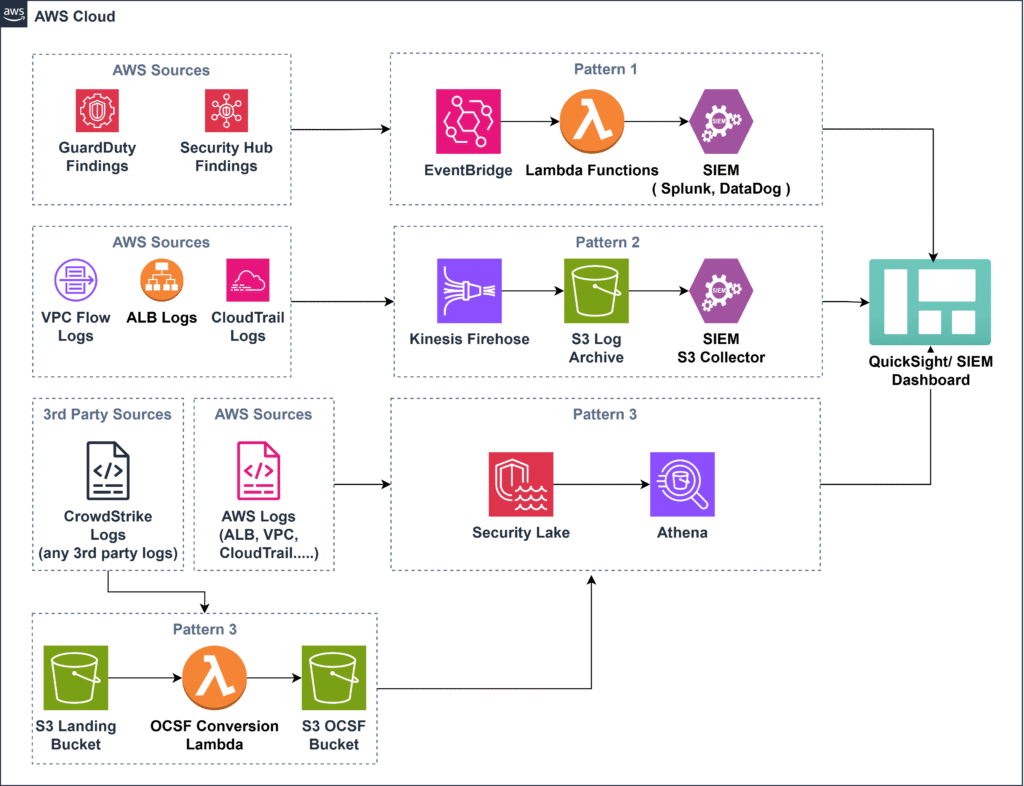
Below is a high-level integration flow:
Detection & Telemetry Layer:
- AWS Config
- GuardDuty
- Security Hub
- CloudTrail
Event Processing Layer:
- Amazon EventBridge
Routing & Data Layer:
- AWS Lambda (real-time forwarding)
- Kinesis Data Firehose (streaming logs)
- Amazon S3 (log retention)
- AWS Security Lake (OCSF normalization)
External Platforms:
- Splunk
- QRadar
- Datadog
- CrowdStrike
- SOAR tools
Findings originate in AWS-native services, are normalized in Security Hub, routed via EventBridge or streaming services, and finally consumed by analytics or SIEM platforms.
Multi-Account Consideration
In large enterprises, it is recommended to centralize logging and analytics in a dedicated security or logging account to reduce blast radius and simplify governance. For multi-region environments, aggregate findings centrally using cross-region Security Hub and GuardDuty configuration.
- Use AWS Organizations.
- Designate a delegated administrator for Security Hub and GuardDuty.
- Aggregate findings into a central security account.
- Route events cross-account using EventBridge event bus policies.
This ensures centralized visibility while preserving account isolation.
Key Integration Patterns
Pattern 1: EventBridge + Lambda to Third-Party API
This pattern extends the event-driven remediation pipeline (introduced in part 3) to external security platforms for real-time alert forwarding and automation. Security Hub serves as the centralized aggregation layer before findings are routed via EventBridge. Forward consolidated Security Hub findings (including GuardDuty and Config signals) to ensure a consistent schema and severity model across tools.
Ideal for:
- Real-time alert forwarding
- SOAR automation
- Immediate SOC visibility
High-Level Steps:
- Enable GuardDuty, Security Hub, and Config.
- Aggregate findings into Security Hub.
- Create EventBridge rule filtering specific finding types.
- Attach Lambda target.
- Lambda:
- Parses event
- Maps severity
- Enriches metadata (account, region, environment tags)
- Signs and sends HTTPS POST
- Configure retry + Dead Letter Queue (SQS).
Production Enhancements:
- Store API tokens in Secrets Manager
- Use IAM condition keys (aws:SourceArn, aws:SourceAccount)
- Enable structured logging
- Create CloudWatch alarms for failure rate
- Implement exponential backoff for SIEM rate limits
When to Use:
- Low-latency (< seconds) alert requirements
- High-priority findings
- SOAR playbook triggers
Pattern 2: Kinesis Firehose to S3, Then Third-Party Collector
This pattern provides scalable, near-real-time log streaming to third-party platforms using Firehose and S3, making it ideal for high-volume telemetry and compliance retention. This pattern complements Pattern 1 by handling high-volume telemetry rather than discrete security findings.
Ideal for:
- CloudTrail
- VPC Flow Logs
- ALB logs
- High-volume telemetry
High-Level Steps:
- Create Firehose Delivery Stream
- S3 destination
- GZIP compression
- SSE-KMS encryption
- Buffer tuning
- Configure log sources.
- Configure SIEM S3 polling agent.
Enterprise Enhancements:
- Enable S3 object versioning
- Apply lifecycle policies
- Partition S3 by account/region/date
- Monitor delivery failures
Why This Matters:
- Decouples ingestion from processing
- Ensures compliance retention
- Reduces real-time API dependency
Real-world example
A SOC team pushes VPC logs into QRadar using Firehose. Logs are buffered, encrypted, stored in S3, and polled every few minutes. This ensures compliance retention and scalable ingestion. Logs stored in S3 serve as evidence for AWS Audit Manager control validation.
Pattern 3: AWS Security Lake Connector
The Security Lake connector pattern enables integration of both AWS-native and third-party logs into a unified, OCSF-normalized data layer. Unlike Pattern 1 and Pattern 2, which focus on routing and forwarding, Security Lake establishes a unified data foundation for advanced correlation and long-term analytics.
High-Level Steps
- Enable Security Lake (organization-wide recommended)
- Enable supported AWS log sources
- Export third-party logs (e.g., CrowdStrike) to S3
- Convert to OCSF format (Glue or Lambda)
- Register S3 bucket as custom source
- Query via Athena or integrate with SIEM
Sample Query
SELECT *
FROM crowdstrike_logs
WHERE indicator = 'malware'
  AND eventTime > current_date - interval '1' day
Security Lake becomes the centralized analytics plane.
Operational Enhancements:
- Partition data by date/account
- Use Lake Formation for access control
- Optimize Athena queries with partition pruning
- Apply lifecycle policies for cost control
When to Use Which Pattern
The choice of integration pattern depends on latency requirements, data volume, and correlation needs.
| Requirement | Pattern 1 | Pattern 2 | Pattern 3 |
|---|---|---|---|
| Real-time alerts | ✅ | ❌ | ❌ |
| High-volume logs | ❌ | ✅ | ✅ |
| Long-term analytics | ❌ | ⚠️ | ✅ |
| Compliance retention | ⚠️ | ✅ | ✅ |
| Cross-source correlation | ❌ | ❌ | ✅ |
Configuring AWS Side of the Integration
The AWS-side configuration ensures findings are standardized, securely routed, and auditable before being shared with external systems.
- Enable Security Hub and GuardDuty
- Create EventBridge Rule for Findings
- Lambda to Forward to Third-Party Tool
- IAM Permissions for Lambda
Additional Enterprise Considerations:
- Version-control Lambda and EventBridge rules
- Place Lambda inside VPC if outbound restrictions apply
- Use NAT or PrivateLink for secure egress
- Enable CloudTrail for integration auditing
- Monitor Lambda concurrency limits
- Deploy via Infrastructure as Code (Terraform/CloudFormation)
Integrating CrowdStrike with AWS
CrowdStrike Falcon is primarily an endpoint detection and response (EDR/XDR) platform. It provides deep visibility into:
- Process execution
- File activity
- Network connections
- Behavioral indicators of compromise (IOCs)
- Malware detections
- Lateral movement attempts
While AWS services like GuardDuty and Security Hub detect suspicious cloud-side activity, CrowdStrike detects suspicious endpoint-side behavior. Integrating both enables full attack-chain visibility.
Why This Integration Matters
Without integration:
- GuardDuty may detect suspicious IAM API calls.
- CrowdStrike may detect malware on an EC2 instance.
- These alerts remain in separate tools.
With integration, you can correlate:
- Cloud API Misuse: Example: An IAM user suddenly performs unusual API calls (detected by GuardDuty).
- IAM Anomalies: Example: Privilege escalation or suspicious AssumeRole activity identified in CloudTrail.
- Endpoint Compromise Indicators: Example: CrowdStrike detects malware execution on the same EC2 instance.
Such correlated signals may indicate credential compromise, privilege escalation, malware deployment, and potential lateral movement. Cross-domain correlation significantly improves detection confidence while reducing false positives.
Integration can be bi-directional — AWS findings can be forwarded to SIEM platforms, while endpoint telemetry can be ingested into Security Lake for centralized analytics.
Below is a practical, high-level implementation approach.
- Step 1: Deploy Falcon Sensor on ECS, Fargate, or EC2
- Step 2: Export CrowdStrike Logs to Amazon S3
- Step 3: Normalize Schema to OCSF
- Step 4: Register with AWS Security Lake
- Step 5: Query or Forward to SIEM
- Option A: Query with Athena
- Option B: Forward to SIEM
We will have a separate blog dedicated to CrowdStrike integration with AWS services.
Visualizing Findings in Third-Party Dashboards
Visualization is only meaningful if underlying data is normalized and consistently tagged across accounts and environments. Done correctly, dashboards transform security events into operational insight.
SOC teams require:
- Severity-based prioritization
- Cross-account filtering
- Cloud + endpoint correlation
Tools like Splunk / Datadog:
- Use HTTP Event Collector (HEC)
- Map AWS severity to SIEM severity
- Enrich events with account, region, environment
- Track auto-remediation success rate to measure automation effectiveness.
Operational Enhancements:
- Monitor ingestion latency
- Separate indexes per environment
- Create alert thresholds
QuickSight (AWS-Native Users)
For organizations that prefer AWS-native analytics, Amazon QuickSight can visualize Security Lake or Athena datasets.
Use Cases:
- Executive dashboards
- Compliance trend tracking
- MTTR measurement
- Visualize Security Lake Datasets
Combine:
- GuardDuty findings
- Config compliance violations
- Endpoint telemetry
- IAM activity
Track:
- Findings by severity
- Time to remediation
- Most common violated controls
- Compliance score trends
Security and Compliance Considerations
Expanded best practices:
- Use VPC endpoints
- Encrypt logs with CMK
- Rotate API keys
- Enforce TLS 1.2+ and certificate validation for outbound integrations.
- Enable CloudTrail for monitoring
- Validate permissions with IAM Access Analyzer
- Classify log data before exporting to third-party tools to ensure sensitive data handling policies are maintained
- Define log retention policies aligned with regulatory requirements and business risk tolerance.
Governance Enhancements:
- Enforce IaC deployment
- Apply change management
- Separate duties between detection and response teams
- Conduct periodic access reviews
AWS Audit Manager can assess:
- Encryption
- Retention
- Access controls
Cost and Performance Considerations
Cost optimization should not compromise detection fidelity; instead, focus on filtering noise while preserving high-value security signals.
Monitor:
- EventBridge event volume
- Lambda invocation rate
- Firehose ingestion size (GB/month)
- Security Lake storage growth
- Athena query scan size
- SIEM ingestion licensing costs
Optimization tips:
- Filter only actionable findings
- Use log compression
- Apply S3 lifecycle policies
- Partition data to reduce Athena scan cost
- Limit high-frequency polling
Conclusion and Next Steps
Integrating third-party tools with AWS native security services allows organizations to move from isolated detection mechanisms to a unified, enterprise-ready security model. At scale, this architecture creates a security integration fabric that spans accounts, regions, and technology domains.
By leveraging:
- Security Hub
- EventBridge
- Lambda
- Kinesis Data Firehose
- Security Lake
You can extend AWS threat detection into any SIEM, SOAR, or XDR platform.
Together, part 1 (Continuous Compliance), part 3 (Automated Remediation), and this blog (Enterprise Integration) form a closed-loop security lifecycle: Detect → Remediate → Correlate → Visualize → Improve.
Next Steps:
- Set up Security Lake organization-wide
- Pilot one integration pattern (GuardDuty → Splunk)
- Extend part 3 remediation Lambda to also notify SIEM
- Validate pipeline with Audit Manager
- Monitor cost and optimize ingestion
About the Author
Deepali Sonune is a DevOps engineer with over 12 years of industry experience, including 9+ years specializing in AWS. She designs and implements high-performance, secure, and governance-driven cloud architectures. Deepali collaborates closely with development and IT teams to streamline release processes, combining deep engineering expertise with strong automation and security practices.
 Linkedin